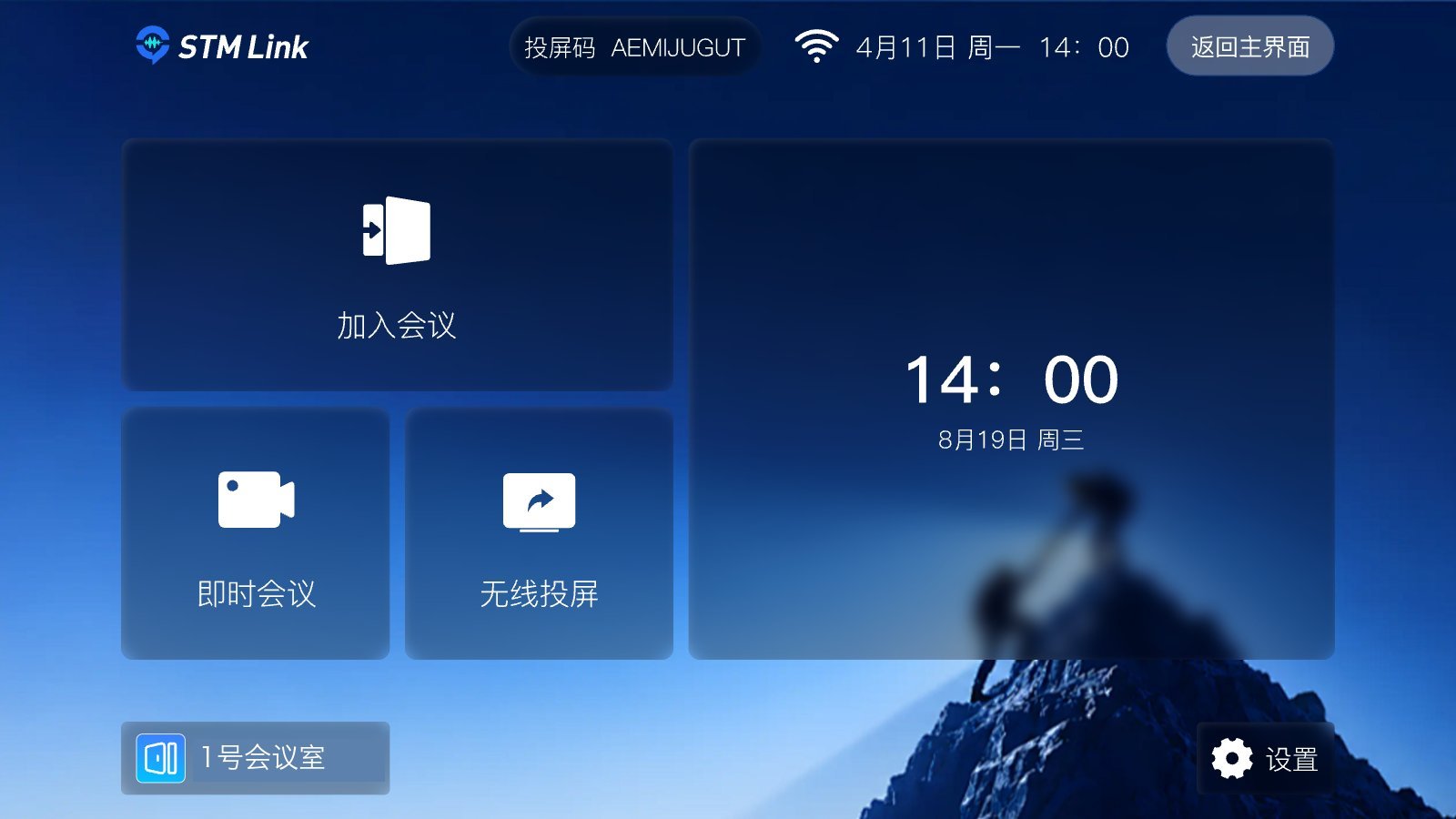
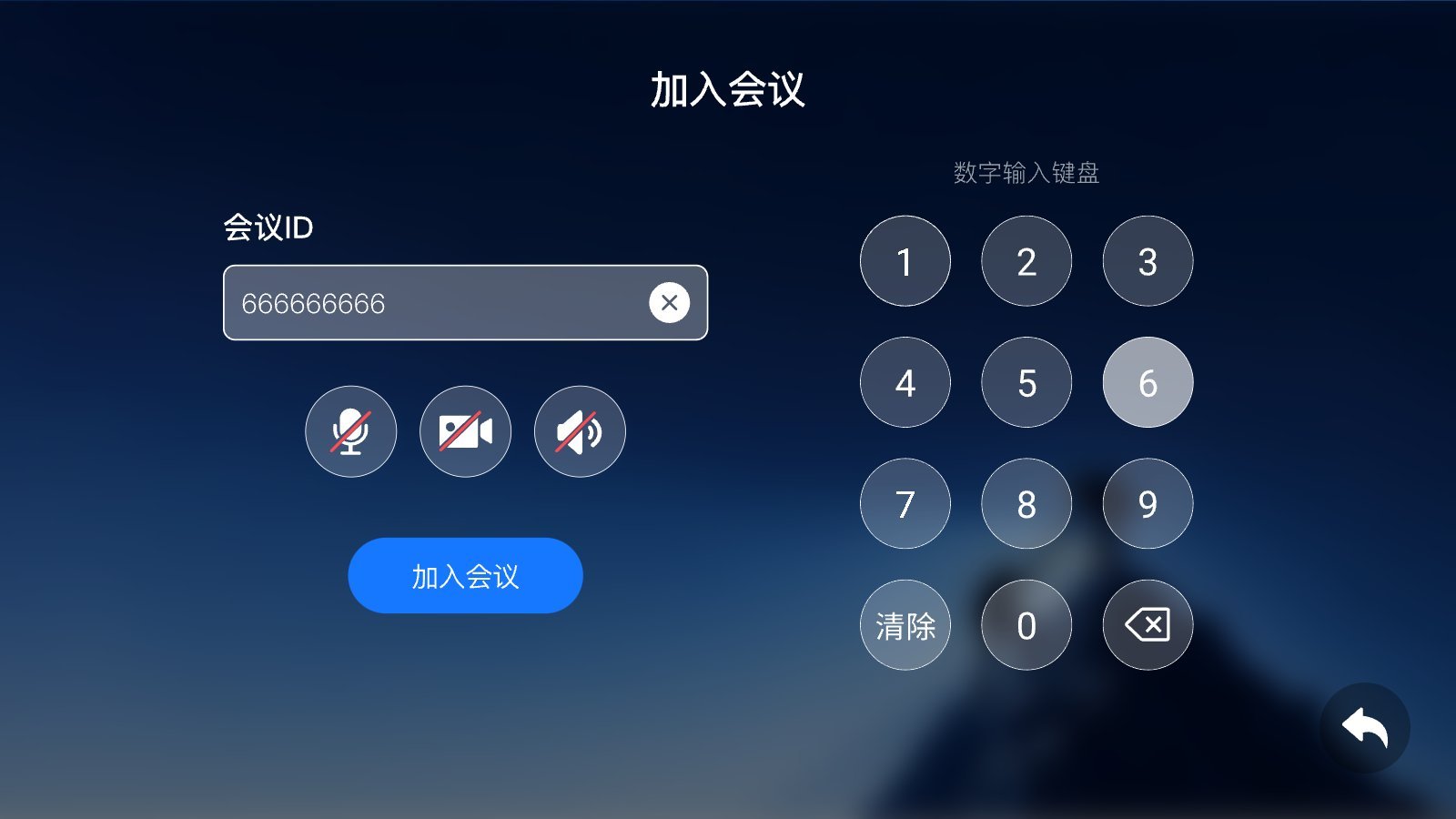
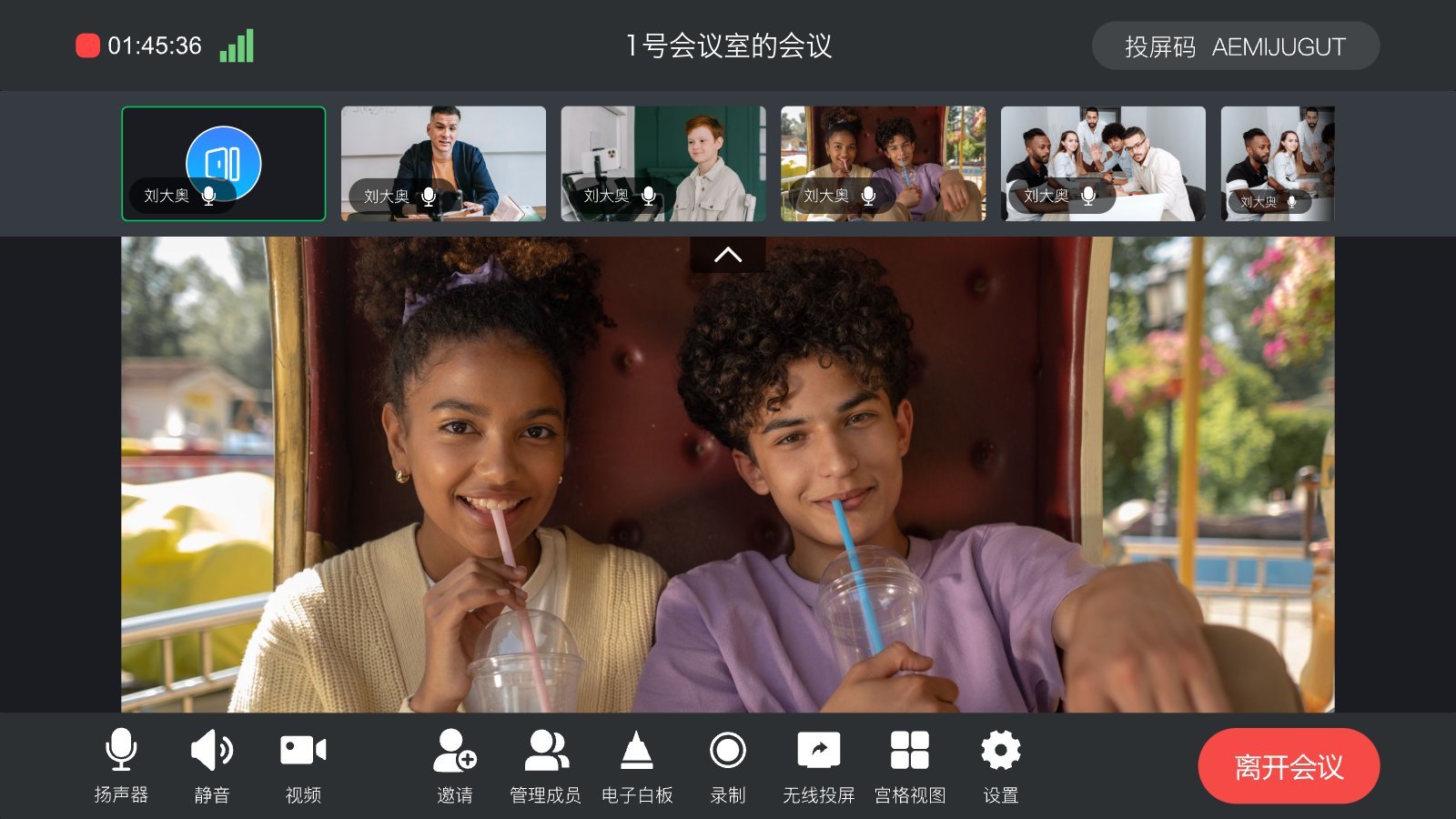
{"docsConfig":{"theme":"mint","$schema":"https://mintlify.com/docs.json","name":"STMLink Docs","description":"STMLink 开发者文档:SRTC 音视频 SDK(频道通信、云录制与直播、语音录制、语音识别)与 SMeeting 会议 SDK(房间、会议管理),覆盖 iOS / Android / Windows / Web / 微信小程序 / C(服务端·嵌入式)多端接入与服务端 API。 STMLink developer docs: the SRTC audio/video SDK (channels, cloud recording and live streaming, voice recording, speech recognition) and the SMeeting conferencing SDK (rooms and meetings), covering client integration on iOS, Android, Windows, Web, WeChat Mini Programs and C (server/embedded), plus the Server API.","colors":{"primary":"#0066FF","light":"#3385FF","dark":"#0052CC"},"logo":{"light":"https://mintcdn.com/freewind/-N23X1jpF3KMqIP_/logo/light.svg?fit=max\u0026auto=format\u0026n=-N23X1jpF3KMqIP_\u0026q=85\u0026s=c87be878176892b493466cf0647c68cc","dark":"https://mintcdn.com/freewind/-N23X1jpF3KMqIP_/logo/dark.svg?fit=max\u0026auto=format\u0026n=-N23X1jpF3KMqIP_\u0026q=85\u0026s=d6697b8422020261e5703917bcf26a6b"},"favicon":"https://mintcdn.com/freewind/-N23X1jpF3KMqIP_/favicon.svg?fit=max\u0026auto=format\u0026n=-N23X1jpF3KMqIP_\u0026q=85\u0026s=dcf59f85b4c1c24462b5f99c37ff73d4","footer":{"socials":{"website":"https://www.stmlink.com"},"links":[{"header":"产品","items":[{"label":"官网","href":"https://www.stmlink.com"},{"label":"SRTC 音视频 SDK","href":"https://docs.stmlink.com/zh/rtc/overview"},{"label":"SMeeting 会议 SDK","href":"https://docs.stmlink.com/zh/meeting/overview"}]},{"header":"支持","items":[{"label":"联系我们","href":"https://www.stmlink.com"}]}]},"contextual":{"options":["copy","view","chatgpt","claude"],"display":"header"},"markdown":{"instructions":["对外开放的服务端接口有两组前缀,都用同一套鉴权:`/server/v1/...`(SRTC 与 SMeeting 的主接口)和 `/stm/srvapi/v1/...`(SMeeting 的用户体系,服务端极简对接会用到)。鉴权是 app_id + nonce + timestamp + signature 四个请求头,用 app_key 做 HMAC-SHA256 签名,只能从业务方自己的后端调用。除这两组前缀外的接口均为内部接口,不要建议客户调用。 Public server APIs use two path prefixes with the same authentication: `/server/v1/...` (the main APIs of both SRTC and SMeeting) and `/stm/srvapi/v1/...` (the SMeeting user system, used by server-side low-code integration). Authenticate with four request headers, app_id + nonce + timestamp + signature, where signature is HMAC-SHA256 keyed with app_key; call these APIs only from the customer's own backend. Any other path is internal: never suggest calling it.","app_key 是服务端密钥,绝不能出现在客户端代码、前端配置或移动 App 里。客户端加入频道用的 token 必须由业务方后端签发后下发(SRTC 走 `/server/v1/channel/grant`,SMeeting 走 `/stm/srvapi/v1/member/grant`)。 app_key is a server-side secret and must never appear in client code, frontend config, or a mobile app. The token a client uses to join must be issued by the customer's backend and passed down to the client (SRTC: `/server/v1/channel/grant`; SMeeting: `/stm/srvapi/v1/member/grant`).","SRTC 与 SMeeting 是上下两层不同的产品,术语不通用:SRTC 是音视频底座,说「频道 channel」「加入 / 退出」;SMeeting 建在 SRTC 之上,说「房间 room」「会议 meeting」「进入 / 退出」。回答时按用户所在的层用对应术语,不要把「房间」「会议」安到 SRTC 的接口上,也不要用「频道」「加入 / 离开」描述 SMeeting 的概念(接口标识符原样保留)。 SRTC and SMeeting are two separate layers with different terminology. SRTC is the audio/video foundation: it has channels, and users join and leave a channel. SMeeting is built on top of SRTC: it has rooms and meetings, and members enter and exit a meeting. Answer in the terms of the layer the user is working with: never apply \"room\" or \"meeting\" to SRTC APIs, and never describe SMeeting concepts in prose with \"channel\", \"join\", or \"leave\" (API identifiers such as `force_join` keep their literal names).","同一能力在各端 SDK 里的包名、类名、方法名并不相同。写示例代码时请使用文档中该端自己的 API,不要把一个端的写法套到另一个端上。苹果平台每个产品都有两套 SDK(Swift 原生与 Objective-C),两套 API 不能混用。 Package, class, and method names differ between platform SDKs for the same capability. In sample code, use the API documented for that platform; never carry one platform's code over to another. On Apple platforms each product ships two SDKs (native Swift and Objective-C) whose APIs must not be mixed."]},"styling":{"latex":false},"navigation":{"languages":[{"language":"zh","href":"zh/rtc/overview"},{"language":"en","footer":{"socials":{"website":"https://www.stmlink.com/en"},"links":[{"header":"Products","items":[{"label":"Website","href":"https://www.stmlink.com/en"},{"label":"SRTC Audio \u0026 Video SDK","href":"https://docs.stmlink.com/en/rtc/overview"},{"label":"SMeeting Conferencing SDK","href":"https://docs.stmlink.com/en/meeting/overview"}]},{"header":"Support","items":[{"label":"Contact us","href":"https://www.stmlink.com/en"}]}]},"href":"en/rtc/overview"}]}},"deployment":{"deploymentMetadataValue":{"subdomain":"freewind","hasAudioNarration":false,"actualSubdomain":"freewind","customDomains":["docs.stmlink.com"],"gitSource":{"type":"github","owner":"seastart","repo":"stmlink-docs","deployBranch":"main","contentDirectory":"","isPrivate":true,"mountPath":"","label":""},"chroma":{"liveDeploymentHistoryId":"6ae0a0e48f66b62075d9f6d6","collectionId":"05c56cbd-b7bf-4654-89eb-3c91e3d1b633","schemaVersion":"v3","latestBuiltDeploymentHistoryId":"6ae0a0e48f66b62075d9f6d6"},"entitlements":{},"buildId":"6ae435eba5e160088bd3a3ba","clientVersion":"0.0.4021","searchFilterCounts":[{"language":"zh","tag":"SRTC 音视频 SDK","count":168},{"language":"en","tag":"SRTC Audio \u0026 Video SDK","count":153},{"language":"zh","tag":"SMeeting 会议 SDK","count":142},{"language":"en","tag":"SMeeting Conferencing SDK","count":116},{"language":"zh","tag":"接口文档","count":103},{"language":"en","tag":"API reference","count":101},{"language":"zh","tag":"进阶实践","count":69},{"language":"en","tag":"Android SDK","count":64},{"language":"zh","tag":"Android SDK","count":64},{"language":"en","tag":"Advanced","count":49},{"language":"en","tag":"Swift SDK (iOS/macOS)","count":44},{"language":"zh","tag":"Swift SDK(iOS/macOS)","count":44},{"language":"en","tag":"Windows SDK","count":41},{"language":"zh","tag":"HarmonyOS SDK","count":41},{"language":"zh","tag":"Windows SDK","count":41},{"language":"en","tag":"Web SDK","count":30},{"language":"zh","tag":"Web SDK","count":30},{"language":"en","tag":"iOS SDK (Objective-C)","count":27},{"language":"zh","tag":"iOS SDK","count":27},{"language":"en","tag":"Server API","count":22}]},"assistantConfig":{"enableAskAiButton":false,"enableStarterQuestions":false,"enableContextualStarterQuestions":false,"enableAskAiSearchBar":true},"basePath":"","hasChatPermissions":false,"hasWebMcpPermissions":false,"toggles":[{"name":"kill-isr","enabled":true,"variant":{"name":"disabled","enabled":false,"feature_enabled":true},"impressionData":false},{"name":"agent-mintlify-slack","enabled":true,"variant":{"name":"disabled","enabled":false,"feature_enabled":true},"impressionData":false},{"name":"agent-integrations-settings","enabled":true,"variant":{"name":"disabled","enabled":false,"feature_enabled":true},"impressionData":false},{"name":"automations-pr-grouping","enabled":true,"variant":{"name":"disabled","enabled":false,"feature_enabled":true},"impressionData":false},{"name":"custom-prefix","enabled":true,"variant":{"name":"disabled","enabled":false,"feature_enabled":true},"impressionData":false},{"name":"analytics-v7","enabled":true,"variant":{"name":"disabled","enabled":false,"feature_enabled":true},"impressionData":false},{"name":"user-flows-analytics","enabled":true,"variant":{"name":"disabled","enabled":false,"feature_enabled":true},"impressionData":false},{"name":"no-publish-flow","enabled":true,"variant":{"name":"disabled","enabled":false,"feature_enabled":true},"impressionData":false},{"name":"workos-onboarding","enabled":true,"variant":{"name":"disabled","enabled":false,"feature_enabled":true},"impressionData":false},{"name":"llms-txt-v2","enabled":true,"variant":{"name":"disabled","enabled":false,"feature_enabled":true},"impressionData":false},{"name":"snapshot-serving-live","enabled":true,"variant":{"name":"disabled","enabled":false,"feature_enabled":true},"impressionData":false},{"name":"stripTemperatureMiddleware","enabled":true,"variant":{"name":"disabled","enabled":false,"feature_enabled":true},"impressionData":false},{"name":"support-platform-pylon-zendesk","enabled":true,"variant":{"name":"disabled","enabled":false,"feature_enabled":true},"impressionData":false},{"name":"snapshot-serving","enabled":true,"variant":{"name":"disabled","enabled":false,"feature_enabled":true},"impressionData":false},{"name":"instant-rollback","enabled":true,"variant":{"name":"disabled","enabled":false,"feature_enabled":true},"impressionData":false},{"name":"granular-notifications-server","enabled":true,"variant":{"name":"disabled","enabled":false,"feature_enabled":true},"impressionData":false},{"name":"granular-notifications","enabled":true,"variant":{"name":"disabled","enabled":false,"feature_enabled":true},"impressionData":false},{"name":"automations-fable","enabled":true,"variant":{"name":"disabled","enabled":false,"feature_enabled":true},"impressionData":false},{"name":"fixed-ai-action-pricing","enabled":true,"variant":{"name":"disabled","enabled":false,"feature_enabled":true},"impressionData":false},{"name":"automation-resolve-merge-conflict","enabled":true,"variant":{"name":"disabled","enabled":false,"feature_enabled":true},"impressionData":false},{"name":"scoped-publishing","enabled":true,"variant":{"name":"disabled","enabled":false,"feature_enabled":true},"impressionData":false},{"name":"mintql","enabled":true,"variant":{"name":"disabled","enabled":false,"feature_enabled":true},"impressionData":false},{"name":"page-level-analytics","enabled":true,"variant":{"name":"disabled","enabled":false,"feature_enabled":true},"impressionData":false},{"name":"editor-version-history-v2","enabled":true,"variant":{"name":"disabled","enabled":false,"feature_enabled":true},"impressionData":false},{"name":"billing-page-v2","enabled":true,"variant":{"name":"disabled","enabled":false,"feature_enabled":true},"impressionData":false},{"name":"workspace-projects","enabled":true,"variant":{"name":"disabled","enabled":false,"feature_enabled":true},"impressionData":false},{"name":"assistant-v5","enabled":true,"variant":{"name":"disabled","enabled":false,"feature_enabled":true},"impressionData":false},{"name":"byok-sep-25","enabled":true,"variant":{"name":"disabled","enabled":false,"feature_enabled":true},"impressionData":false},{"name":"fork-pr-previews","enabled":true,"variant":{"name":"disabled","enabled":false,"feature_enabled":true},"impressionData":false},{"name":"revalidation-jwt","enabled":true,"variant":{"name":"disabled","enabled":false,"feature_enabled":true},"impressionData":false},{"name":"vite-origin","enabled":true,"variant":{"name":"disabled","enabled":false,"feature_enabled":true},"impressionData":false},{"name":"billing-updated-9-15","enabled":true,"variant":{"name":"disabled","enabled":false,"feature_enabled":true},"impressionData":false},{"name":"workos-sso-scim","enabled":true,"variant":{"name":"disabled","enabled":false,"feature_enabled":true},"impressionData":false},{"name":"hobby-abuse-scan","enabled":true,"variant":{"name":"disabled","enabled":false,"feature_enabled":true},"impressionData":false},{"name":"dashboard-inbox","enabled":true,"variant":{"name":"disabled","enabled":false,"feature_enabled":true},"impressionData":false},{"name":"workos-signup","enabled":true,"variant":{"name":"disabled","enabled":false,"feature_enabled":true},"impressionData":false},{"name":"turbopuffer-dual-write","enabled":true,"variant":{"name":"disabled","enabled":false,"feature_enabled":true},"impressionData":false},{"name":"workos-enabled","enabled":true,"variant":{"name":"disabled","enabled":false,"feature_enabled":true},"impressionData":false}],"googleFontsInlined":false},"customCss":[],"page":{"pagePath":"zh/product/terminals/tv","slug":"/zh/product/terminals/tv","pageMetadata":{"title":"STM Link Rooms(安卓 TV 大屏版)","sidebarTitle":"STM Link Rooms(TV 版)","description":"装在会议室电视、大屏上的会议终端 App:遥控器操作,会议室账号登录后一键加入或发起会议,手机输投屏码无线投屏,会中支持主持人管控、白板、云录制、多种布局。介绍功能、典型使用流程与获取方式","href":"/zh/product/terminals/tv"},"description":{"compiledSource":"\"use strict\";\nconst {jsx: _jsx} = arguments[0];\nconst {useMDXComponents: _provideComponents} = arguments[0];\nfunction _createMdxContent(props) {\n const _components = {\n p: \"p\",\n ..._provideComponents(),\n ...props.components\n };\n return _jsx(_components.p, {\n children: \"装在会议室电视、大屏上的会议终端 App:遥控器操作,会议室账号登录后一键加入或发起会议,手机输投屏码无线投屏,会中支持主持人管控、白板、云录制、多种布局。介绍功能、典型使用流程与获取方式\"\n });\n}\nfunction MDXContent(props = {}) {\n const {wrapper: MDXLayout} = {\n ..._provideComponents(),\n ...props.components\n };\n return MDXLayout ? _jsx(MDXLayout, {\n ...props,\n children: _jsx(_createMdxContent, {\n ...props\n })\n }) : _createMdxContent(props);\n}\nreturn {\n default: MDXContent\n};\n","frontmatter":{},"scope":{}},"pageType":"default","mdx":{"mdxSource":{"compiledSource":"\"use strict\";const{Fragment:_Fragment,jsx:_jsx,jsxs:_jsxs}=arguments[0];const{useMDXComponents:_provideComponents}=arguments[0];function _createMdxContent(props){const _components={a:`a`,hr:`hr`,p:`p`,strong:`strong`,tbody:`tbody`,td:`td`,th:`th`,thead:`thead`,tr:`tr`,..._provideComponents(),...props.components},{Heading,OptimizedImage,Table}=_components;if(!Heading)_missingMdxReference(`Heading`,true);if(!OptimizedImage)_missingMdxReference(`OptimizedImage`,true);if(!Table)_missingMdxReference(`Table`,true);return _jsxs(_Fragment,{children:[_jsxs(_components.p,{children:[_jsx(_components.strong,{children:`STM Link Rooms`}),` 是我们会议产品的大屏版。装在会议室的安卓电视或大屏上,用`,_jsx(_components.strong,{children:`遥控器`}),`就能完成入会、开会、投屏,\n和手机、电脑上的参会人开同一场会。`]}),`\n`,_jsx(OptimizedImage,{src:`https://mintcdn.com/freewind/EF59QLb6N-9opFfC/zh/product/terminals/images/tv-home.jpg?fit=max\u0026auto=format\u0026n=EF59QLb6N-9opFfC\u0026q=85\u0026s=f1017b08f6a9ca5215b1d0e723fbe75e`,alt:`STM Link Rooms 首页`,\"data-og-width\":`1600`,width:`1600`,\"data-og-height\":`900`,height:`900`,\"data-path\":`zh/product/terminals/images/tv-home.jpg`,\"data-optimize\":`true`,\"data-opv\":`3`,srcset:`https://mintcdn.com/freewind/EF59QLb6N-9opFfC/zh/product/terminals/images/tv-home.jpg?w=280\u0026fit=max\u0026auto=format\u0026n=EF59QLb6N-9opFfC\u0026q=85\u0026s=8a5a1f089480b2cf19c8fb6ff286227d 280w, https://mintcdn.com/freewind/EF59QLb6N-9opFfC/zh/product/terminals/images/tv-home.jpg?w=560\u0026fit=max\u0026auto=format\u0026n=EF59QLb6N-9opFfC\u0026q=85\u0026s=1061e0988b91c2c200ca001e900a341b 560w, https://mintcdn.com/freewind/EF59QLb6N-9opFfC/zh/product/terminals/images/tv-home.jpg?w=840\u0026fit=max\u0026auto=format\u0026n=EF59QLb6N-9opFfC\u0026q=85\u0026s=d6f0e99a4829c60d33e983fc026fdb9a 840w, https://mintcdn.com/freewind/EF59QLb6N-9opFfC/zh/product/terminals/images/tv-home.jpg?w=1100\u0026fit=max\u0026auto=format\u0026n=EF59QLb6N-9opFfC\u0026q=85\u0026s=56d7d6dff3a8707b53a1635aa57c790c 1100w, https://mintcdn.com/freewind/EF59QLb6N-9opFfC/zh/product/terminals/images/tv-home.jpg?w=1650\u0026fit=max\u0026auto=format\u0026n=EF59QLb6N-9opFfC\u0026q=85\u0026s=dbbed9ebbb1511d5f6bbeb79ab9668ef 1650w, https://mintcdn.com/freewind/EF59QLb6N-9opFfC/zh/product/terminals/images/tv-home.jpg?w=2500\u0026fit=max\u0026auto=format\u0026n=EF59QLb6N-9opFfC\u0026q=85\u0026s=467d98476e3fc819fe2af3ccbab236e4 2500w`}),`\n`,_jsx(_components.hr,{}),`\n`,_jsx(Heading,{level:`2`,id:`为会议室设计`,children:`为会议室设计`}),`\n`,_jsxs(Table,{children:[_jsx(_components.thead,{children:_jsxs(_components.tr,{children:[_jsx(_components.th,{children:`特点`}),_jsx(_components.th,{children:`说明`})]})}),_jsxs(_components.tbody,{children:[_jsxs(_components.tr,{children:[_jsx(_components.td,{children:_jsx(_components.strong,{children:`遥控器操作`})}),_jsx(_components.td,{children:`全部界面支持遥控器焦点移动,自带大屏数字键盘和全键盘`})]}),_jsxs(_components.tr,{children:[_jsx(_components.td,{children:_jsx(_components.strong,{children:`会议室账号`})}),_jsx(_components.td,{children:`一台大屏绑定一个会议室账号,开机即在线,不依赖个人手机`})]}),_jsxs(_components.tr,{children:[_jsx(_components.td,{children:_jsx(_components.strong,{children:`三个入口`})}),_jsx(_components.td,{children:`首页只有「加入会议」「即时会议」「无线投屏」三张大卡片,一眼可见`})]}),_jsxs(_components.tr,{children:[_jsx(_components.td,{children:_jsx(_components.strong,{children:`横屏固定`})}),_jsx(_components.td,{children:`专为 16:9 大屏排版,远距离也看得清`})]})]})]}),`\n`,_jsx(_components.hr,{}),`\n`,_jsx(Heading,{level:`2`,id:`主要功能`,children:`主要功能`}),`\n`,_jsxs(_components.p,{children:[_jsx(_components.strong,{children:`加入会议`}),`:输入会议号,入会前可以先开关麦克风、摄像头、扬声器;会议有密码时提示输入。`]}),`\n`,_jsx(OptimizedImage,{src:`https://mintcdn.com/freewind/EF59QLb6N-9opFfC/zh/product/terminals/images/tv-join.jpg?fit=max\u0026auto=format\u0026n=EF59QLb6N-9opFfC\u0026q=85\u0026s=47599b546a9809f192c26f46d22635e7`,alt:`加入会议`,\"data-og-width\":`1600`,width:`1600`,\"data-og-height\":`900`,height:`900`,\"data-path\":`zh/product/terminals/images/tv-join.jpg`,\"data-optimize\":`true`,\"data-opv\":`3`,srcset:`https://mintcdn.com/freewind/EF59QLb6N-9opFfC/zh/product/terminals/images/tv-join.jpg?w=280\u0026fit=max\u0026auto=format\u0026n=EF59QLb6N-9opFfC\u0026q=85\u0026s=53dea616a4b9294cadbcfee276bfe973 280w, https://mintcdn.com/freewind/EF59QLb6N-9opFfC/zh/product/terminals/images/tv-join.jpg?w=560\u0026fit=max\u0026auto=format\u0026n=EF59QLb6N-9opFfC\u0026q=85\u0026s=6546cbdee026493263d40ff2a92e3660 560w, https://mintcdn.com/freewind/EF59QLb6N-9opFfC/zh/product/terminals/images/tv-join.jpg?w=840\u0026fit=max\u0026auto=format\u0026n=EF59QLb6N-9opFfC\u0026q=85\u0026s=1d6007a4389dcfed9250cae89eb79d35 840w, https://mintcdn.com/freewind/EF59QLb6N-9opFfC/zh/product/terminals/images/tv-join.jpg?w=1100\u0026fit=max\u0026auto=format\u0026n=EF59QLb6N-9opFfC\u0026q=85\u0026s=3e5e5002a46c01dba60807b48194bc18 1100w, https://mintcdn.com/freewind/EF59QLb6N-9opFfC/zh/product/terminals/images/tv-join.jpg?w=1650\u0026fit=max\u0026auto=format\u0026n=EF59QLb6N-9opFfC\u0026q=85\u0026s=799fb5379b9c6237d90f49e90b264777 1650w, https://mintcdn.com/freewind/EF59QLb6N-9opFfC/zh/product/terminals/images/tv-join.jpg?w=2500\u0026fit=max\u0026auto=format\u0026n=EF59QLb6N-9opFfC\u0026q=85\u0026s=153a0e580a42148fa214f04e5b555ac7 2500w`}),`\n`,_jsxs(_components.p,{children:[_jsx(_components.strong,{children:`即时会议`}),`:输入会议名称直接开会,会中可以把会议号和二维码展示给其他人加入。`]}),`\n`,_jsxs(_components.p,{children:[_jsx(_components.strong,{children:`无线投屏`}),`:首页和顶栏常驻`,_jsx(_components.strong,{children:`投屏码`}),`,参会人在手机上打开 STM Link,点「无线投屏」输入投屏码,就能把手机画面投到大屏上。`]}),`\n`,_jsxs(_components.p,{children:[_jsx(_components.strong,{children:`会中`}),`:`]}),`\n`,_jsx(OptimizedImage,{src:`https://mintcdn.com/freewind/EF59QLb6N-9opFfC/zh/product/terminals/images/tv-meeting.jpg?fit=max\u0026auto=format\u0026n=EF59QLb6N-9opFfC\u0026q=85\u0026s=d755f42ea8656c229defdb7a2e85615d`,alt:`会中画面`,\"data-og-width\":`1600`,width:`1600`,\"data-og-height\":`900`,height:`900`,\"data-path\":`zh/product/terminals/images/tv-meeting.jpg`,\"data-optimize\":`true`,\"data-opv\":`3`,srcset:`https://mintcdn.com/freewind/EF59QLb6N-9opFfC/zh/product/terminals/images/tv-meeting.jpg?w=280\u0026fit=max\u0026auto=format\u0026n=EF59QLb6N-9opFfC\u0026q=85\u0026s=0845d652e8bf908834aa0ab02c32fb33 280w, https://mintcdn.com/freewind/EF59QLb6N-9opFfC/zh/product/terminals/images/tv-meeting.jpg?w=560\u0026fit=max\u0026auto=format\u0026n=EF59QLb6N-9opFfC\u0026q=85\u0026s=3ecf02b0e5be4afa3b271877fa2195b5 560w, https://mintcdn.com/freewind/EF59QLb6N-9opFfC/zh/product/terminals/images/tv-meeting.jpg?w=840\u0026fit=max\u0026auto=format\u0026n=EF59QLb6N-9opFfC\u0026q=85\u0026s=632c12b59b88805c63f64454a7c5c01b 840w, https://mintcdn.com/freewind/EF59QLb6N-9opFfC/zh/product/terminals/images/tv-meeting.jpg?w=1100\u0026fit=max\u0026auto=format\u0026n=EF59QLb6N-9opFfC\u0026q=85\u0026s=6bec87d5a0790e205fdad4a4fbda65eb 1100w, https://mintcdn.com/freewind/EF59QLb6N-9opFfC/zh/product/terminals/images/tv-meeting.jpg?w=1650\u0026fit=max\u0026auto=format\u0026n=EF59QLb6N-9opFfC\u0026q=85\u0026s=e12d5ce6a7b1571bc2becb020d9a32b0 1650w, https://mintcdn.com/freewind/EF59QLb6N-9opFfC/zh/product/terminals/images/tv-meeting.jpg?w=2500\u0026fit=max\u0026auto=format\u0026n=EF59QLb6N-9opFfC\u0026q=85\u0026s=543a02a576f521b951fde411d562ec74 2500w`}),`\n`,_jsxs(Table,{children:[_jsx(_components.thead,{children:_jsxs(_components.tr,{children:[_jsx(_components.th,{children:`功能`}),_jsx(_components.th,{children:`说明`})]})}),_jsxs(_components.tbody,{children:[_jsxs(_components.tr,{children:[_jsx(_components.td,{children:`音视频`}),_jsx(_components.td,{children:`麦克风、扬声器、摄像头开关`})]}),_jsxs(_components.tr,{children:[_jsx(_components.td,{children:`布局`}),_jsx(_components.td,{children:`宫格(可翻页)、演讲者、缩略图三种视图`})]}),_jsxs(_components.tr,{children:[_jsx(_components.td,{children:`邀请`}),_jsx(_components.td,{children:`展示会议号、密码和入会二维码`})]}),_jsxs(_components.tr,{children:[_jsx(_components.td,{children:`成员管理(主持人)`}),_jsx(_components.td,{children:`改名、静音 / 解除静音、开关视频、停止共享、移出会议、全员静音`})]}),_jsxs(_components.tr,{children:[_jsx(_components.td,{children:`电子白板`}),_jsx(_components.td,{children:`会中发起白板协作`})]}),_jsxs(_components.tr,{children:[_jsx(_components.td,{children:`云录制`}),_jsx(_components.td,{children:`一键开始 / 停止录制`})]}),_jsxs(_components.tr,{children:[_jsx(_components.td,{children:`质量检测`}),_jsx(_components.td,{children:`查看网络、音频、视频、共享的码率、帧率、丢包、延时`})]})]})]}),`\n`,_jsxs(_components.p,{children:[_jsx(_components.strong,{children:`设置`}),`:入会时默认开启麦克风 / 摄像头 / 扬声器、语音激励,摄像头与麦克风、扬声器选择,版本检查更新。`]}),`\n`,_jsx(_components.hr,{}),`\n`,_jsx(Heading,{level:`2`,id:`和其他终端的关系`,children:`和其他终端的关系`}),`\n`,_jsxs(Table,{children:[_jsx(_components.thead,{children:_jsxs(_components.tr,{children:[_jsx(_components.th,{children:`终端`}),_jsx(_components.th,{children:`适合`})]})}),_jsxs(_components.tbody,{children:[_jsxs(_components.tr,{children:[_jsx(_components.td,{children:_jsx(_components.strong,{children:`STM Link Rooms`})}),_jsx(_components.td,{children:`会议室大屏,用我们的会议平台开会`})]}),_jsxs(_components.tr,{children:[_jsx(_components.td,{children:_jsx(_components.a,{href:`/zh/product/terminals/softsip`,children:`软 SIP / H.323 终端`})}),_jsx(_components.td,{children:`安卓大屏要作为 SIP / H.323 终端,接入第三方视频会议系统`})]}),_jsxs(_components.tr,{children:[_jsx(_components.td,{children:_jsx(_components.a,{href:`/zh/product/device-access/sip-h323`,children:`硬件视频终端接入`})}),_jsx(_components.td,{children:`会议室已有华为、科达等硬件终端`})]})]})]}),`\n`,_jsx(_components.hr,{}),`\n`,_jsx(Heading,{level:`2`,id:`获取`,children:`获取`}),`\n`,_jsxs(_components.p,{children:[`STM Link Rooms 基于 `,_jsx(_components.a,{href:`/zh/meeting/overview`,children:`SMeeting 会议 SDK`}),` 构建,按项目交付,\n`,_jsxs(_components.strong,{children:[`安装包与会议室账号请`,_jsx(_components.a,{href:`https://www.stmlink.com/contact`,children:`联系我们`})]}),`。`]})]})}function MDXContent(props={}){const{wrapper:MDXLayout}={..._provideComponents(),...props.components};return MDXLayout?_jsx(MDXLayout,{...props,children:_jsx(_createMdxContent,{...props})}):_createMdxContent(props)}return{default:MDXContent};function _missingMdxReference(id,component){throw new Error(`Expected `+(component?`component`:`object`)+\" `\"+id+\"` to be defined: you likely forgot to import, pass, or provide it.\")}","frontmatter":{},"scope":{"config":{},"pageMetadata":{"title":"STM Link Rooms(安卓 TV 大屏版)","sidebarTitle":"STM Link Rooms(TV 版)","description":"装在会议室电视、大屏上的会议终端 App:遥控器操作,会议室账号登录后一键加入或发起会议,手机输投屏码无线投屏,会中支持主持人管控、白板、云录制、多种布局。介绍功能、典型使用流程与获取方式","href":"/zh/product/terminals/tv"}}},"mdxSourceWithNoJs":null},"mdxExtracts":{"tableOfContents":[{"title":"为会议室设计","slug":"为会议室设计","depth":2,"children":[]},{"title":"主要功能","slug":"主要功能","depth":2,"children":[]},{"title":"和其他终端的关系","slug":"和其他终端的关系","depth":2,"children":[]},{"title":"获取","slug":"获取","depth":2,"children":[]}],"codeExamples":{}},"jsLinks":[],"subdomain":"freewind","siteName":"STMLink Docs","title":"STM Link Rooms(安卓 TV 大屏版) - STMLink Docs","navMaps":{"firstHrefInVersion":{},"firstHrefInLanguage":{"zh":{"href":"/zh/product/terminals/tv","matchLevel":0},"en":{"href":"/en/product/terminals/tv","matchLevel":1}}},"lastModified":"2026-10-13T07:12:20.409Z","originalFileLocation":"zh/product/terminals/tv.md","locale":"zh"},"headHtml":"\u003cscript data-mint-head>(function(){var d=document.documentElement,p=null;if(!p){try{p=localStorage.getItem(\"isDarkMode\")}catch(e){}if(p==='true')p='dark';else if(p==='false')p='light';if(p!=='light'\u0026\u0026p!=='dark'\u0026\u0026p!=='system')p=\"system\"}var r=p==='system'?(matchMedia(\"(prefers-color-scheme: dark)\").matches?'dark':'light'):p;d.classList.remove(r==='dark'?'light':'dark');d.classList.add(r);d.setAttribute(\"data-theme-preference\",p)})();\u003c/script>\u003cmeta data-mint-head name=\"description\" content=\"装在会议室电视、大屏上的会议终端 App:遥控器操作,会议室账号登录后一键加入或发起会议,手机输投屏码无线投屏,会中支持主持人管控、白板、云录制、多种布局。介绍功能、典型使用流程与获取方式\">\u003cmeta data-mint-head name=\"application-name\" content=\"STMLink Docs\">\u003cmeta data-mint-head name=\"generator\" content=\"Mintlify\">\u003clink data-mint-head rel=\"icon\" type=\"image/png\" sizes=\"192x192\" href=\"/mintlify-assets/_mintlify/favicons/freewind/ZKlibvJ7BVLSobx8/_generated/favicon/android-chrome-192x192.png\" media=\"(prefers-color-scheme: light)\">\u003clink data-mint-head rel=\"apple-touch-icon\" type=\"image/png\" sizes=\"180x180\" href=\"/mintlify-assets/_mintlify/favicons/freewind/ZKlibvJ7BVLSobx8/_generated/favicon/apple-touch-icon.png\">\u003clink data-mint-head rel=\"icon\" type=\"image/png\" sizes=\"16x16\" href=\"/mintlify-assets/_mintlify/favicons/freewind/ZKlibvJ7BVLSobx8/_generated/favicon/favicon-16x16.png\" media=\"(prefers-color-scheme: light)\">\u003clink data-mint-head rel=\"icon\" type=\"image/png\" sizes=\"32x32\" href=\"/mintlify-assets/_mintlify/favicons/freewind/ZKlibvJ7BVLSobx8/_generated/favicon/favicon-32x32.png\" media=\"(prefers-color-scheme: light)\">\u003clink data-mint-head rel=\"shortcut icon\" type=\"image/x-icon\" href=\"/mintlify-assets/_mintlify/favicons/freewind/ZKlibvJ7BVLSobx8/_generated/favicon/favicon.ico\" media=\"(prefers-color-scheme: light)\">\u003clink data-mint-head rel=\"icon\" type=\"image/png\" sizes=\"192x192\" href=\"/mintlify-assets/_mintlify/favicons/freewind/ZKlibvJ7BVLSobx8/_generated/favicon-dark/android-chrome-192x192.png\" media=\"(prefers-color-scheme: dark)\">\u003clink data-mint-head rel=\"icon\" type=\"image/png\" sizes=\"16x16\" href=\"/mintlify-assets/_mintlify/favicons/freewind/ZKlibvJ7BVLSobx8/_generated/favicon-dark/favicon-16x16.png\" media=\"(prefers-color-scheme: dark)\">\u003clink data-mint-head rel=\"icon\" type=\"image/png\" sizes=\"32x32\" href=\"/mintlify-assets/_mintlify/favicons/freewind/ZKlibvJ7BVLSobx8/_generated/favicon-dark/favicon-32x32.png\" media=\"(prefers-color-scheme: dark)\">\u003clink data-mint-head rel=\"shortcut icon\" type=\"image/x-icon\" href=\"/mintlify-assets/_mintlify/favicons/freewind/ZKlibvJ7BVLSobx8/_generated/favicon-dark/favicon.ico\" media=\"(prefers-color-scheme: dark)\">\u003cmeta data-mint-head property=\"og:title\" content=\"STM Link Rooms(安卓 TV 大屏版) - STMLink Docs\">\u003cmeta data-mint-head property=\"og:description\" content=\"装在会议室电视、大屏上的会议终端 App:遥控器操作,会议室账号登录后一键加入或发起会议,手机输投屏码无线投屏,会中支持主持人管控、白板、云录制、多种布局。介绍功能、典型使用流程与获取方式\">\u003cmeta data-mint-head property=\"og:site_name\" content=\"STMLink Docs\">\u003cmeta data-mint-head property=\"og:url\" content=\"https://docs.stmlink.com/zh/product/terminals/tv\">\u003cmeta data-mint-head property=\"og:type\" content=\"website\">\u003cmeta data-mint-head property=\"og:image\" content=\"https://freewind.mintlify.app/_mintlify/api/og/v2?division=%E7%BB%88%E7%AB%AF%E4%BA%A7%E5%93%81\u0026amp;title=STM+Link+Rooms%EF%BC%88%E5%AE%89%E5%8D%93+TV+%E5%A4%A7%E5%B1%8F%E7%89%88%EF%BC%89\u0026amp;description=%E8%A3%85%E5%9C%A8%E4%BC%9A%E8%AE%AE%E5%AE%A4%E7%94%B5%E8%A7%86%E3%80%81%E5%A4%A7%E5%B1%8F%E4%B8%8A%E7%9A%84%E4%BC%9A%E8%AE%AE%E7%BB%88%E7%AB%AF+App%EF%BC%9A%E9%81%A5%E6%8E%A7%E5%99%A8%E6%93%8D%E4%BD%9C%EF%BC%8C%E4%BC%9A%E8%AE%AE%E5%AE%A4%E8%B4%A6%E5%8F%B7%E7%99%BB%E5%BD%95%E5%90%8E%E4%B8%80%E9%94%AE%E5%8A%A0%E5%85%A5%E6%88%96%E5%8F%91%E8%B5%B7%E4%BC%9A%E8%AE%AE%EF%BC%8C%E6%89%8B%E6%9C%BA%E8%BE%93%E6%8A%95%E5%B1%8F%E7%A0%81%E6%97%A0%E7%BA%BF%E6%8A%95%E5%B1%8F%EF%BC%8C%E4%BC%9A%E4%B8%AD%E6%94%AF%E6%8C%81%E4%B8%BB%E6%8C%81%E4%BA%BA%E7%AE%A1%E6%8E%A7%E3%80%81%E7%99%BD%E6%9D%BF%E3%80%81%E4%BA%91%E5%BD%95%E5%88%B6%E3%80%81%E5%A4%9A%E7%A7%8D%E5%B8%83%E5%B1%80%E3%80%82%E4%BB%8B%E7%BB%8D%E5%8A%9F%E8%83%BD%E3%80%81%E5%85%B8%E5%9E%8B%E4%BD%BF%E7%94%A8%E6%B5%81%E7%A8%8B%E4%B8%8E%E8%8E%B7%E5%8F%96%E6%96%B9%E5%BC%8F\u0026amp;theme=654b2206dad3993961863283\u0026amp;signature=45f53f76e182a176bb438c181180ef3669cb0ab07a7e54627924d521962a6a40\">\u003cmeta data-mint-head property=\"og:image:width\" content=\"1200\">\u003cmeta data-mint-head property=\"og:image:height\" content=\"630\">\u003cmeta data-mint-head name=\"twitter:card\" content=\"summary_large_image\">\u003cmeta data-mint-head name=\"twitter:title\" content=\"STM Link Rooms(安卓 TV 大屏版) - STMLink Docs\">\u003cmeta data-mint-head name=\"twitter:description\" content=\"装在会议室电视、大屏上的会议终端 App:遥控器操作,会议室账号登录后一键加入或发起会议,手机输投屏码无线投屏,会中支持主持人管控、白板、云录制、多种布局。介绍功能、典型使用流程与获取方式\">\u003cmeta data-mint-head name=\"twitter:image\" content=\"https://freewind.mintlify.app/_mintlify/api/og/v2?division=%E7%BB%88%E7%AB%AF%E4%BA%A7%E5%93%81\u0026amp;title=STM+Link+Rooms%EF%BC%88%E5%AE%89%E5%8D%93+TV+%E5%A4%A7%E5%B1%8F%E7%89%88%EF%BC%89\u0026amp;description=%E8%A3%85%E5%9C%A8%E4%BC%9A%E8%AE%AE%E5%AE%A4%E7%94%B5%E8%A7%86%E3%80%81%E5%A4%A7%E5%B1%8F%E4%B8%8A%E7%9A%84%E4%BC%9A%E8%AE%AE%E7%BB%88%E7%AB%AF+App%EF%BC%9A%E9%81%A5%E6%8E%A7%E5%99%A8%E6%93%8D%E4%BD%9C%EF%BC%8C%E4%BC%9A%E8%AE%AE%E5%AE%A4%E8%B4%A6%E5%8F%B7%E7%99%BB%E5%BD%95%E5%90%8E%E4%B8%80%E9%94%AE%E5%8A%A0%E5%85%A5%E6%88%96%E5%8F%91%E8%B5%B7%E4%BC%9A%E8%AE%AE%EF%BC%8C%E6%89%8B%E6%9C%BA%E8%BE%93%E6%8A%95%E5%B1%8F%E7%A0%81%E6%97%A0%E7%BA%BF%E6%8A%95%E5%B1%8F%EF%BC%8C%E4%BC%9A%E4%B8%AD%E6%94%AF%E6%8C%81%E4%B8%BB%E6%8C%81%E4%BA%BA%E7%AE%A1%E6%8E%A7%E3%80%81%E7%99%BD%E6%9D%BF%E3%80%81%E4%BA%91%E5%BD%95%E5%88%B6%E3%80%81%E5%A4%9A%E7%A7%8D%E5%B8%83%E5%B1%80%E3%80%82%E4%BB%8B%E7%BB%8D%E5%8A%9F%E8%83%BD%E3%80%81%E5%85%B8%E5%9E%8B%E4%BD%BF%E7%94%A8%E6%B5%81%E7%A8%8B%E4%B8%8E%E8%8E%B7%E5%8F%96%E6%96%B9%E5%BC%8F\u0026amp;theme=654b2206dad3993961863283\u0026amp;signature=45f53f76e182a176bb438c181180ef3669cb0ab07a7e54627924d521962a6a40\">\u003cmeta data-mint-head name=\"twitter:image:width\" content=\"1200\">\u003cmeta data-mint-head name=\"twitter:image:height\" content=\"630\">\u003cmeta data-mint-head name=\"msapplication-config\" content=\"/mintlify-assets/_mintlify/favicons/freewind/ZKlibvJ7BVLSobx8/_generated/favicon/browserconfig.xml\">\u003cmeta data-mint-head name=\"apple-mobile-web-app-title\" content=\"STMLink Docs\">\u003cmeta data-mint-head name=\"msapplication-TileColor\" content=\"#0066FF\">\u003clink data-mint-head rel=\"canonical\" href=\"https://docs.stmlink.com/zh/product/terminals/tv\">\u003clink data-mint-head rel=\"alternate\" type=\"application/xml\" href=\"/sitemap.xml\">\u003clink data-mint-head rel=\"alternate\" type=\"text/markdown\" href=\"/zh/product/terminals/tv.md\">\u003clink data-mint-head rel=\"alternate\" hreflang=\"zh\" href=\"https://docs.stmlink.com/zh/product/terminals/tv\">\u003clink data-mint-head rel=\"alternate\" hreflang=\"en\" href=\"https://docs.stmlink.com/en/product/terminals/tv\">\u003clink data-mint-head rel=\"alternate\" hreflang=\"x-default\" href=\"https://docs.stmlink.com/zh/product/terminals/tv\">\u003cscript data-mint-head type=\"application/ld+json\">{\"@context\":\"https://schema.org\",\"@graph\":[{\"@type\":\"Organization\",\"@id\":\"https://docs.stmlink.com/#organization\",\"name\":\"STMLink Docs\",\"url\":\"https://docs.stmlink.com\",\"logo\":{\"@type\":\"ImageObject\",\"url\":\"https://mintcdn.com/freewind/-N23X1jpF3KMqIP_/logo/light.svg?fit=max\u0026auto=format\u0026n=-N23X1jpF3KMqIP_\u0026q=85\u0026s=c87be878176892b493466cf0647c68cc\"}},{\"@type\":\"WebSite\",\"@id\":\"https://docs.stmlink.com#website\",\"name\":\"STMLink Docs\",\"url\":\"https://docs.stmlink.com\",\"publisher\":{\"@id\":\"https://docs.stmlink.com/#organization\"}},{\"@type\":\"WebPage\",\"@id\":\"https://docs.stmlink.com/zh/product/terminals/tv#webpage\",\"url\":\"https://docs.stmlink.com/zh/product/terminals/tv\",\"name\":\"STM Link Rooms(安卓 TV 大屏版)\",\"description\":\"装在会议室电视、大屏上的会议终端 App:遥控器操作,会议室账号登录后一键加入或发起会议,手机输投屏码无线投屏,会中支持主持人管控、白板、云录制、多种布局。介绍功能、典型使用流程与获取方式\",\"dateModified\":\"2026-10-13T07:12:20.409Z\",\"isPartOf\":{\"@id\":\"https://docs.stmlink.com#website\"},\"breadcrumb\":{\"@id\":\"https://docs.stmlink.com/zh/product/terminals/tv#breadcrumb\"}},{\"@type\":\"BreadcrumbList\",\"@id\":\"https://docs.stmlink.com/zh/product/terminals/tv#breadcrumb\",\"itemListElement\":[{\"@type\":\"ListItem\",\"position\":1,\"name\":\"终端产品\",\"item\":\"https://docs.stmlink.com/zh/product/terminals/softsip\"},{\"@type\":\"ListItem\",\"position\":2,\"name\":\"STM Link Rooms(安卓 TV 大屏版)\",\"item\":\"https://docs.stmlink.com/zh/product/terminals/tv\"}]},{\"@type\":[\"Article\",\"TechArticle\"],\"@id\":\"https://docs.stmlink.com/zh/product/terminals/tv#article\",\"headline\":\"STM Link Rooms(安卓 TV 大屏版)\",\"name\":\"STM Link Rooms(安卓 TV 大屏版)\",\"description\":\"装在会议室电视、大屏上的会议终端 App:遥控器操作,会议室账号登录后一键加入或发起会议,手机输投屏码无线投屏,会中支持主持人管控、白板、云录制、多种布局。介绍功能、典型使用流程与获取方式\",\"url\":\"https://docs.stmlink.com/zh/product/terminals/tv\",\"mainEntityOfPage\":{\"@id\":\"https://docs.stmlink.com/zh/product/terminals/tv#webpage\"},\"dateModified\":\"2026-10-13T07:12:20.409Z\",\"publisher\":{\"@id\":\"https://docs.stmlink.com/#organization\"},\"isPartOf\":{\"@id\":\"https://docs.stmlink.com#website\"}}]}\u003c/script>\u003cscript data-mint-head type=\"application/ld+json\">{\"@context\":\"https://schema.org\",\"@type\":\"WebSite\",\"name\":\"STMLink Docs\",\"creator\":{\"@type\":\"Organization\",\"name\":\"Mintlify\",\"url\":\"https://mintlify.com\"}}\u003c/script>","siteName":"STMLink Docs","nav":{"global":null,"languages":[{"language":"zh","tabs":[{"tab":"SRTC 音视频 SDK","pages":[{"title":"SRTC 音视频 SDK","href":"/zh/rtc/overview"}]},{"tab":"SMeeting 会议 SDK","pages":[{"title":"SMeeting 会议 SDK","href":"/zh/meeting/overview"}]},{"tab":"产品与部署","groups":[{"group":"概览","pages":[{"title":"产品全景","href":"/zh/product/overview"},{"title":"管理后台功能一览","href":"/zh/product/admin-console"},{"title":"在线体验","href":"/zh/product/demos"}]},{"group":"设备接入(会议室连接器)","pages":[{"title":"设备接入概览","sidebarTitle":"概览","href":"/zh/product/device-access/overview"},{"title":"SIP / H.323 终端","href":"/zh/product/device-access/sip-h323"},{"title":"接入电话线路","sidebarTitle":"电话线路(SIP)","href":"/zh/product/device-access/phone-lines"},{"title":"GB28181 摄像头","href":"/zh/product/device-access/gb28181"},{"title":"RTSP 视频流","href":"/zh/product/device-access/rtsp"},{"title":"设备接入常见问题","sidebarTitle":"常见问题","href":"/zh/product/device-access/faq"}]},{"group":"终端产品","pages":[{"title":"软 SIP / H.323 终端","sidebarTitle":"软 SIP / H.323 终端","description":"装在安卓大屏、一体机、盒子上的 SIP / H.323 软终端 App:把普通安卓设备变成标准视频会议终端,与硬件终端点对点呼叫、注册到 SIP 服务器或网守、接入我们的会议,支持屏幕共享与电子白板。介绍功能、使用流程与获取方式","href":"/zh/product/terminals/softsip"},{"title":"STM Link Rooms(安卓 TV 大屏版)","sidebarTitle":"STM Link Rooms(TV 版)","href":"/zh/product/terminals/tv"}]},{"group":"私有化部署","pages":[{"title":"组件与架构","description":"私有化部署一套 SRTC / SMeeting 由哪些服务组成、哪些必装哪些按需装、装的顺序、支持的操作系统和数据库(含人大金仓、达梦)、单机与多机部署方式。做部署规划和准备服务器前先读这页","href":"/zh/product/deploy/architecture"},{"title":"网络与端口要求","href":"/zh/product/deploy/ports"},{"title":"内外网与多线路","href":"/zh/product/deploy/networks"},{"title":"多节点与就近接入","href":"/zh/product/deploy/multi-node"},{"title":"光闸跨网接入","href":"/zh/product/deploy/optical-gap"}]}]}]},{"language":"en","footer":{"socials":{"website":"https://www.stmlink.com/en"},"links":[{"header":"Products","items":[{"label":"Website","href":"https://www.stmlink.com/en"},{"label":"SRTC Audio \u0026 Video SDK","href":"https://docs.stmlink.com/en/rtc/overview"},{"label":"SMeeting Conferencing SDK","href":"https://docs.stmlink.com/en/meeting/overview"}]},{"header":"Support","items":[{"label":"Contact us","href":"https://www.stmlink.com/en"}]}]},"pages":[{"title":"en","href":"/en/product/terminals/tv"}]}]},"title":"STM Link Rooms(安卓 TV 大屏版) - STMLink Docs","buildId":"dpl_EnxDqhjaNc9a8MVa833TGULPd9uJ","deploymentId":"dpl_EnxDqhjaNc9a8MVa833TGULPd9uJ","dynamics":["a74be98ba7"],"chunks":["zoom-image-lightbox-CVZVK4hN.js","lightbox-handle-r17bVUz3.js"]}