> ## Documentation Index
> Fetch the complete documentation index at: https://docs.stmlink.com/llms.txt
> Use this file to discover all available pages before exploring further.
> ## Agent Instructions
> 对外开放的服务端接口有两组前缀,都用同一套鉴权:`/server/v1/...`(SRTC 与 SMeeting 的主接口)和 `/stm/srvapi/v1/...`(SMeeting 的用户体系,服务端极简对接会用到)。鉴权是 app_id + nonce + timestamp + signature 四个请求头,用 app_key 做 HMAC-SHA256 签名,只能从业务方自己的后端调用。除这两组前缀外的接口均为内部接口,不要建议客户调用。 Public server APIs use two path prefixes with the same authentication: `/server/v1/...` (the main APIs of both SRTC and SMeeting) and `/stm/srvapi/v1/...` (the SMeeting user system, used by server-side low-code integration). Authenticate with four request headers, app_id + nonce + timestamp + signature, where signature is HMAC-SHA256 keyed with app_key; call these APIs only from the customer's own backend. Any other path is internal: never suggest calling it.
> app_key 是服务端密钥,绝不能出现在客户端代码、前端配置或移动 App 里。客户端加入频道用的 token 必须由业务方后端签发后下发(SRTC 走 `/server/v1/channel/grant`,SMeeting 走 `/stm/srvapi/v1/member/grant`)。 app_key is a server-side secret and must never appear in client code, frontend config, or a mobile app. The token a client uses to join must be issued by the customer's backend and passed down to the client (SRTC: `/server/v1/channel/grant`; SMeeting: `/stm/srvapi/v1/member/grant`).
> SRTC 与 SMeeting 是上下两层不同的产品,术语不通用:SRTC 是音视频底座,说「频道 channel」「加入 / 退出」;SMeeting 建在 SRTC 之上,说「房间 room」「会议 meeting」「进入 / 退出」。回答时按用户所在的层用对应术语,不要把「房间」「会议」安到 SRTC 的接口上,也不要用「频道」「加入 / 离开」描述 SMeeting 的概念(接口标识符原样保留)。 SRTC and SMeeting are two separate layers with different terminology. SRTC is the audio/video foundation: it has channels, and users join and leave a channel. SMeeting is built on top of SRTC: it has rooms and meetings, and members enter and exit a meeting. Answer in the terms of the layer the user is working with: never apply "room" or "meeting" to SRTC APIs, and never describe SMeeting concepts in prose with "channel", "join", or "leave" (API identifiers such as `force_join` keep their literal names).
> 同一能力在各端 SDK 里的包名、类名、方法名并不相同。写示例代码时请使用文档中该端自己的 API,不要把一个端的写法套到另一个端上。苹果平台每个产品都有两套 SDK(Swift 原生与 Objective-C),两套 API 不能混用。 Package, class, and method names differ between platform SDKs for the same capability. In sample code, use the API documented for that platform; never carry one platform's code over to another. On Apple platforms each product ships two SDKs (native Swift and Objective-C) whose APIs must not be mixed.
# Overview
> What SRTC is, its architecture, and which platforms it supports, with links to each platform's integration and quickstart pages. Read this first when evaluating SRTC or picking your platform SDK.
SRTC is a converged audio and video communication component. Built on low-latency audio and video and real-time multi-user interaction, it combines standard audio/video protocol interoperability, MCU (server-side mixing and recording), self-hosted live streaming, and more. It can be deployed on public cloud, private cloud, or hybrid cloud, giving developers a low-cost solution for interactive audio and video.
If you are still deciding between SRTC and SMeeting (the SDK behind STMLink Meeting), see [Choosing SRTC or SMeeting](/en/choose) first.
### Architecture
The real-time audio and video component focuses on cross-platform multi-user audio and video calls and low-latency interaction. It provides SDKs for WeChat Mini Program, Web, Android, iOS, Windows, Linux, and other platforms, so you can integrate quickly and connect to third-party private cloud backends. Combined with our other products, it also supports capabilities such as instant messaging and whiteboards, extending to more business scenarios.
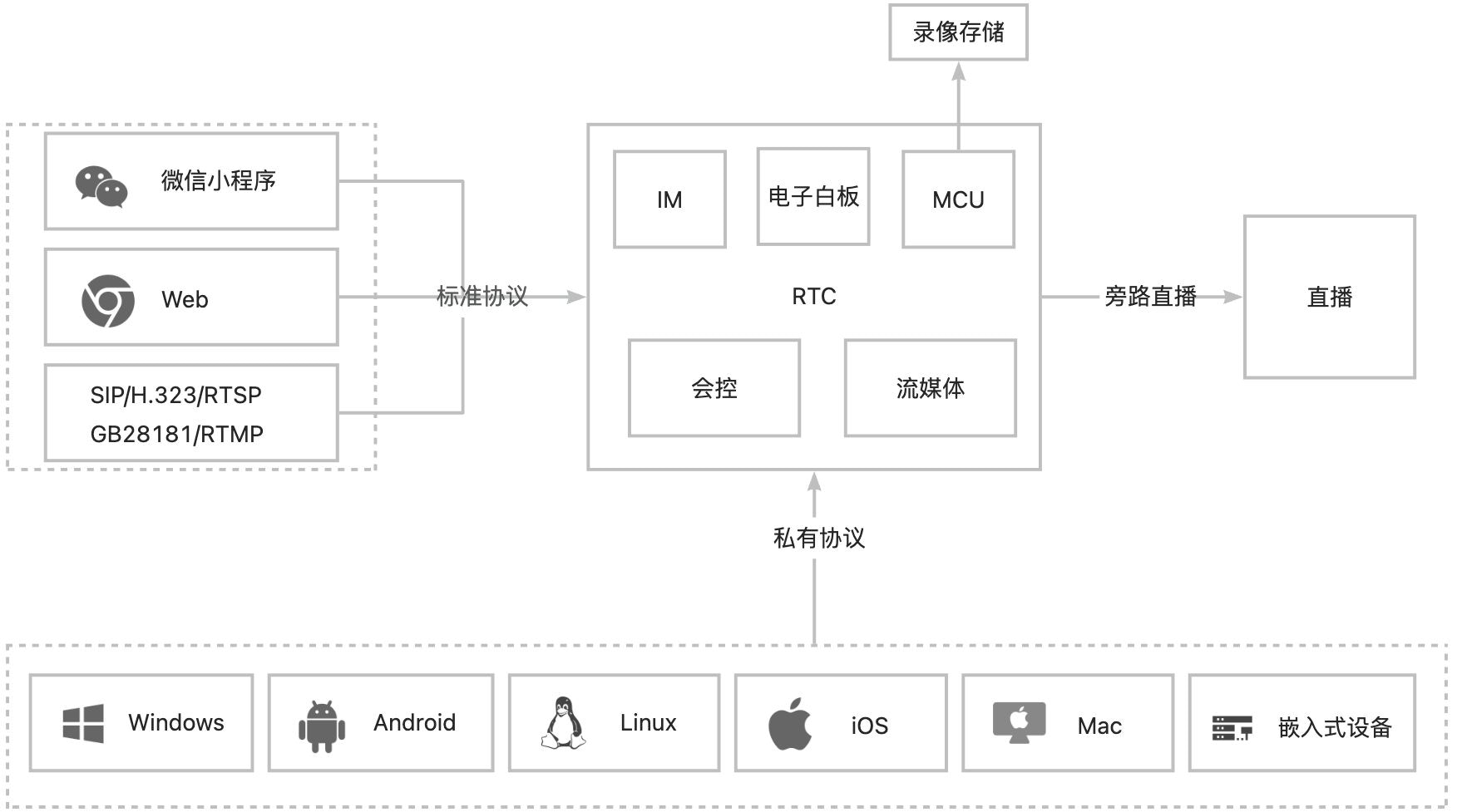 SRTC only handles the audio and video transport itself. It has **no user system and no business rules**—your backend owns both and works with SRTC through the server API.
### Platform support
All platforms interoperate, and behavior is aligned across them.
| Platform | Description | Docs |
| - | - | - |
| Web | Browsers, and also WeChat Mini Program (embedded via `web-view`) | [Integration](/en/rtc/web/integration) · [Quickstart](/en/rtc/web/quickstart) |
| Android | Phones, set-top boxes, embedded devices | [Integration](/en/rtc/android/integration) · [Quickstart](/en/rtc/android/quickstart) |
| Windows | Desktop clients, C++ API | [Integration](/zh/rtc/windows/integration) (Chinese) · [Quickstart](/zh/rtc/windows/quickstart) (Chinese) |
| Swift | iOS and macOS, `import SRTC` | [Integration](/en/rtc/swift/integration) · [Quickstart](/en/rtc/swift/quickstart) |
| iOS | Objective-C, `RTCEngineKit` | [Integration](/zh/rtc/ios/integration) (Chinese) · [Quickstart](/zh/rtc/ios/quickstart) (Chinese) |
| C | Server and embedded, pure C API | [Integration](/zh/rtc/capi/integration) (Chinese) · [Quickstart](/zh/rtc/capi/quickstart) (Chinese) |
| Python | Server-side AI (voice bots, recording, transcription), sends and receives PCM, supports pipecat | [Integration](/en/rtc/python/integration) · [Quickstart](/en/rtc/python/quickstart) |
| Server | HTTP endpoints and event callbacks | [Server API](/en/rtc/server-api/overview) |
Each platform is distributed differently: Web via npm, Android via Maven, and Windows as a zip downloaded from the artifact repository. See the corresponding integration page for each.
Swift uses Swift Package Manager (prebuilt XCFramework), and Python uses PyPI (`pip install srtc`). Contact us for the iOS and C SDK packages.
SRTC only handles the audio and video transport itself. It has **no user system and no business rules**—your backend owns both and works with SRTC through the server API.
### Platform support
All platforms interoperate, and behavior is aligned across them.
| Platform | Description | Docs |
| - | - | - |
| Web | Browsers, and also WeChat Mini Program (embedded via `web-view`) | [Integration](/en/rtc/web/integration) · [Quickstart](/en/rtc/web/quickstart) |
| Android | Phones, set-top boxes, embedded devices | [Integration](/en/rtc/android/integration) · [Quickstart](/en/rtc/android/quickstart) |
| Windows | Desktop clients, C++ API | [Integration](/zh/rtc/windows/integration) (Chinese) · [Quickstart](/zh/rtc/windows/quickstart) (Chinese) |
| Swift | iOS and macOS, `import SRTC` | [Integration](/en/rtc/swift/integration) · [Quickstart](/en/rtc/swift/quickstart) |
| iOS | Objective-C, `RTCEngineKit` | [Integration](/zh/rtc/ios/integration) (Chinese) · [Quickstart](/zh/rtc/ios/quickstart) (Chinese) |
| C | Server and embedded, pure C API | [Integration](/zh/rtc/capi/integration) (Chinese) · [Quickstart](/zh/rtc/capi/quickstart) (Chinese) |
| Python | Server-side AI (voice bots, recording, transcription), sends and receives PCM, supports pipecat | [Integration](/en/rtc/python/integration) · [Quickstart](/en/rtc/python/quickstart) |
| Server | HTTP endpoints and event callbacks | [Server API](/en/rtc/server-api/overview) |
Each platform is distributed differently: Web via npm, Android via Maven, and Windows as a zip downloaded from the artifact repository. See the corresponding integration page for each.
Swift uses Swift Package Manager (prebuilt XCFramework), and Python uses PyPI (`pip install srtc`). Contact us for the iOS and C SDK packages.