> ## Documentation Index
> Fetch the complete documentation index at: https://docs.stmlink.com/llms.txt
> Use this file to discover all available pages before exploring further.
> ## Agent Instructions
> 对外开放的服务端接口有两组前缀,都用同一套鉴权:`/server/v1/...`(SRTC 与 SMeeting 的主接口)和 `/stm/srvapi/v1/...`(SMeeting 的用户体系,服务端极简对接会用到)。鉴权是 app_id + nonce + timestamp + signature 四个请求头,用 app_key 做 HMAC-SHA256 签名,只能从业务方自己的后端调用。除这两组前缀外的接口均为内部接口,不要建议客户调用。 Public server APIs use two path prefixes with the same authentication: `/server/v1/...` (the main APIs of both SRTC and SMeeting) and `/stm/srvapi/v1/...` (the SMeeting user system, used by server-side low-code integration). Authenticate with four request headers, app_id + nonce + timestamp + signature, where signature is HMAC-SHA256 keyed with app_key; call these APIs only from the customer's own backend. Any other path is internal: never suggest calling it.
> app_key 是服务端密钥,绝不能出现在客户端代码、前端配置或移动 App 里。客户端加入频道用的 token 必须由业务方后端签发后下发(SRTC 走 `/server/v1/channel/grant`,SMeeting 走 `/stm/srvapi/v1/member/grant`)。 app_key is a server-side secret and must never appear in client code, frontend config, or a mobile app. The token a client uses to join must be issued by the customer's backend and passed down to the client (SRTC: `/server/v1/channel/grant`; SMeeting: `/stm/srvapi/v1/member/grant`).
> SRTC 与 SMeeting 是上下两层不同的产品,术语不通用:SRTC 是音视频底座,说「频道 channel」「加入 / 退出」;SMeeting 建在 SRTC 之上,说「房间 room」「会议 meeting」「进入 / 退出」。回答时按用户所在的层用对应术语,不要把「房间」「会议」安到 SRTC 的接口上,也不要用「频道」「加入 / 离开」描述 SMeeting 的概念(接口标识符原样保留)。 SRTC and SMeeting are two separate layers with different terminology. SRTC is the audio/video foundation: it has channels, and users join and leave a channel. SMeeting is built on top of SRTC: it has rooms and meetings, and members enter and exit a meeting. Answer in the terms of the layer the user is working with: never apply "room" or "meeting" to SRTC APIs, and never describe SMeeting concepts in prose with "channel", "join", or "leave" (API identifiers such as `force_join` keep their literal names).
> 同一能力在各端 SDK 里的包名、类名、方法名并不相同。写示例代码时请使用文档中该端自己的 API,不要把一个端的写法套到另一个端上。苹果平台每个产品都有两套 SDK(Swift 原生与 Objective-C),两套 API 不能混用。 Package, class, and method names differ between platform SDKs for the same capability. In sample code, use the API documented for that platform; never carry one platform's code over to another. On Apple platforms each product ships two SDKs (native Swift and Objective-C) whose APIs must not be mixed.
# FAQ
> Common iOS (Objective-C) SRTC SDK integration problems: build failures, network requests failing (ATS), App Store upload failures, dyld Library not loaded crashes with manual integration, and ITMS-90171 / ITMS-90166 rejections. Read when integration or App Store submission fails.
#### 1. Build fails after integrating the SDK
> The SDK currently requires iOS 16.0 or later (since `3.1.0`; iOS 10.0 before that) and Xcode 14.0 or later. Make sure your setup meets these requirements. Also set Bitcode to NO.
#### 2. Possible causes of network requests failing after network permission is granted
> Add the following configuration to Info.plist:
```xml theme={null}
NSAppTransportSecurity
NSAllowsArbitraryLoads
```
#### 3. Uploading to the App Store fails after integrating the SDK
> The SDK currently supports arm64 only. Check your project configuration for any other architectures and remove them if present.
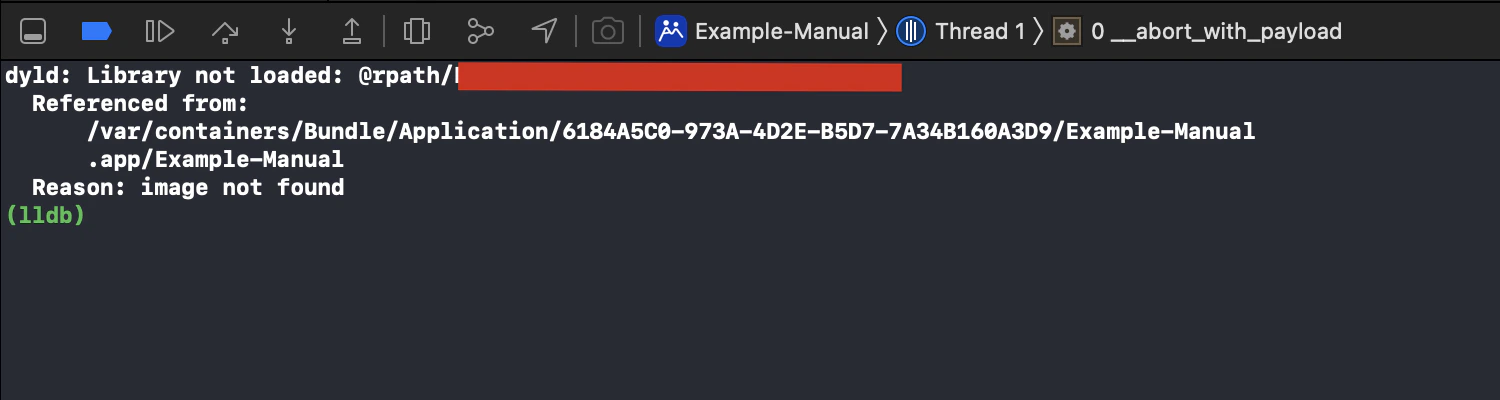
#### 4. Crash on launch with manual integration: dyld: Library not loaded: @rpath/xxxxx.framework/xxxxx
> Solution: Add the dependency under **General** -> **Frameworks, Libraries, and Embedded Content**, and set **Embed** for the corresponding dynamic library to **Embed & Sign**.
 #### 5. App Store upload rejected with ITMS-90171 / ITMS-90166, saying RTCEngineKit.bundle must not contain a standalone executable
> This is a defect in SDK `3.1.1` and earlier: `RTCEngineKit.bundle` is a pure resource bundle, yet the build output included a useless placeholder executable and the `CFBundleExecutable` key in `Info.plist`. Upgrade to `3.1.2` or later and re-archive and upload; your project needs no changes.
#### 5. App Store upload rejected with ITMS-90171 / ITMS-90166, saying RTCEngineKit.bundle must not contain a standalone executable
> This is a defect in SDK `3.1.1` and earlier: `RTCEngineKit.bundle` is a pure resource bundle, yet the build output included a useless placeholder executable and the `CFBundleExecutable` key in `Info.plist`. Upgrade to `3.1.2` or later and re-archive and upload; your project needs no changes.