> ## Documentation Index
> Fetch the complete documentation index at: https://docs.stmlink.com/llms.txt
> Use this file to discover all available pages before exploring further.
> ## Agent Instructions
> 对外开放的服务端接口有两组前缀,都用同一套鉴权:`/server/v1/...`(SRTC 与 SMeeting 的主接口)和 `/stm/srvapi/v1/...`(SMeeting 的用户体系,服务端极简对接会用到)。鉴权是 app_id + nonce + timestamp + signature 四个请求头,用 app_key 做 HMAC-SHA256 签名,只能从业务方自己的后端调用。除这两组前缀外的接口均为内部接口,不要建议客户调用。 Public server APIs use two path prefixes with the same authentication: `/server/v1/...` (the main APIs of both SRTC and SMeeting) and `/stm/srvapi/v1/...` (the SMeeting user system, used by server-side low-code integration). Authenticate with four request headers, app_id + nonce + timestamp + signature, where signature is HMAC-SHA256 keyed with app_key; call these APIs only from the customer's own backend. Any other path is internal: never suggest calling it.
> app_key 是服务端密钥,绝不能出现在客户端代码、前端配置或移动 App 里。客户端加入频道用的 token 必须由业务方后端签发后下发(SRTC 走 `/server/v1/channel/grant`,SMeeting 走 `/stm/srvapi/v1/member/grant`)。 app_key is a server-side secret and must never appear in client code, frontend config, or a mobile app. The token a client uses to join must be issued by the customer's backend and passed down to the client (SRTC: `/server/v1/channel/grant`; SMeeting: `/stm/srvapi/v1/member/grant`).
> SRTC 与 SMeeting 是上下两层不同的产品,术语不通用:SRTC 是音视频底座,说「频道 channel」「加入 / 退出」;SMeeting 建在 SRTC 之上,说「房间 room」「会议 meeting」「进入 / 退出」。回答时按用户所在的层用对应术语,不要把「房间」「会议」安到 SRTC 的接口上,也不要用「频道」「加入 / 离开」描述 SMeeting 的概念(接口标识符原样保留)。 SRTC and SMeeting are two separate layers with different terminology. SRTC is the audio/video foundation: it has channels, and users join and leave a channel. SMeeting is built on top of SRTC: it has rooms and meetings, and members enter and exit a meeting. Answer in the terms of the layer the user is working with: never apply "room" or "meeting" to SRTC APIs, and never describe SMeeting concepts in prose with "channel", "join", or "leave" (API identifiers such as `force_join` keep their literal names).
> 同一能力在各端 SDK 里的包名、类名、方法名并不相同。写示例代码时请使用文档中该端自己的 API,不要把一个端的写法套到另一个端上。苹果平台每个产品都有两套 SDK(Swift 原生与 Objective-C),两套 API 不能混用。 Package, class, and method names differ between platform SDKs for the same capability. In sample code, use the API documented for that platform; never carry one platform's code over to another. On Apple platforms each product ships two SDKs (native Swift and Objective-C) whose APIs must not be mixed.
# Windows UI SDK integration
> Low-code integration with UI for Windows: the open-source SMeeting Windows meeting app (MSVC + Qt), its directory structure, how to integrate it as source code or as a DLL, screenshots, and the exported DemoControl functions and enums. Read this to embed a ready-made meeting UI in a Windows app.
This is the Windows client project of a video conferencing system that integrates the Windows SDK, built with MSVC + Qt.
GitHub source code: [https://github.com/seastart/meeting-windows-demo](https://github.com/seastart/meeting-windows-demo)
### Directory structure
```cpp theme={null}
smeeting-windows-demo // C++ (Qt framework) demo
├─ BaseWindows //Base classes for display windows
├─ CJsonObject // JSON parsing
├─ DataModel // Data entity types
├─ Global // Global parameter configuration
├─ NetWork // Network
├─ res // Resources
│ ├─ Images // Image resources
│ ├─ Qss // Default widget styles (CSS)
├─ SMeetingSdk // SDK configuration
│ ├─ SMeetControl // Basic Meeting SDK call implementation
├─ Tools // Tools
├─ View // Views
│ ├─ Common // Common views
│ ├─ Home // Main window views
│ │ ├─ MainView // Main views in the main window: contacts, meeting list, meeting scheduling
│ │ ├─ ToolView // Dialog views in the main window: meeting history, enter meeting, rename, create instant meeting
│ │ ├─ ToolWidgets // Small widget views in the main window
│ ├─ Login // Login views
│ ├─ Room // In-meeting views
│ │ ├─ Chat //In-meeting chat UI and logic
│ │ ├─ Invite //In-meeting device invitation UI and logic
│ │ ├─ Mcu //In-meeting recording and MCU layout UI and logic
│ │ ├─ Member //In-meeting member control UI and logic
│ │ ├─ RoomMain //Main in-meeting UI and logic
│ │ │ ├─ Layout //In-meeting window layout
│ │ │ │ ├─ Auto //In-meeting window layout - auto layout
│ │ │ │ ├─ Grid //In-meeting window layout - grid layout
│ │ │ │ ├─ OneMore //In-meeting window layout - large/small view layout
│ │ ├─ Setting //In-meeting settings and quality monitoring UI and logic
│ │ ├─ Share //In-meeting sharing window UI and logic
│ │ ├─ Tool //In-meeting tool windows
│ ├─ Test // Test views
├─ MainWidget // Parent main window
├─ DemoControl // Shortcut method calls
```
### Integration options
#### Add the source code directly
This UI demo project is built as an MSVC + Qt project.
If you also develop with MSVC + Qt, you can copy the entire source code into your project, then use the methods provided in the shortcut method calls (`DemoControl.h`) to switch windows or call features (you can of course also modify the code to meet your needs)
Note: because QWKWidgets windows are used, call the following before `QApplication` is initialized
```cpp theme={null}
QGuiApplication::setAttribute(Qt::AA_DontCreateNativeWidgetSiblings);
QApplication a(argc, argv);
...
reutrn a.exec();
```
#### Use the dynamic library
If you don't develop with MSVC + Qt, you can't add this source code to your project. Instead, you can use the compiled DLL and call the code in the program through dynamic library linking. (If you can't build it, contact us for the files.)
The methods in the shortcut method calls (`DemoControl.h`) are exported as C functions, so most developers can call them to launch this program.
Just load the dynamic library and import the exported function names to call them directly
```csharp theme={null}
//C# loading (example)
[DllImport(DllPath, CallingConvention = CallingConvention.Cdecl, ExactSpelling = true)]
public static extern int MEETING_DEMO_Init();
```
### Screens and windows
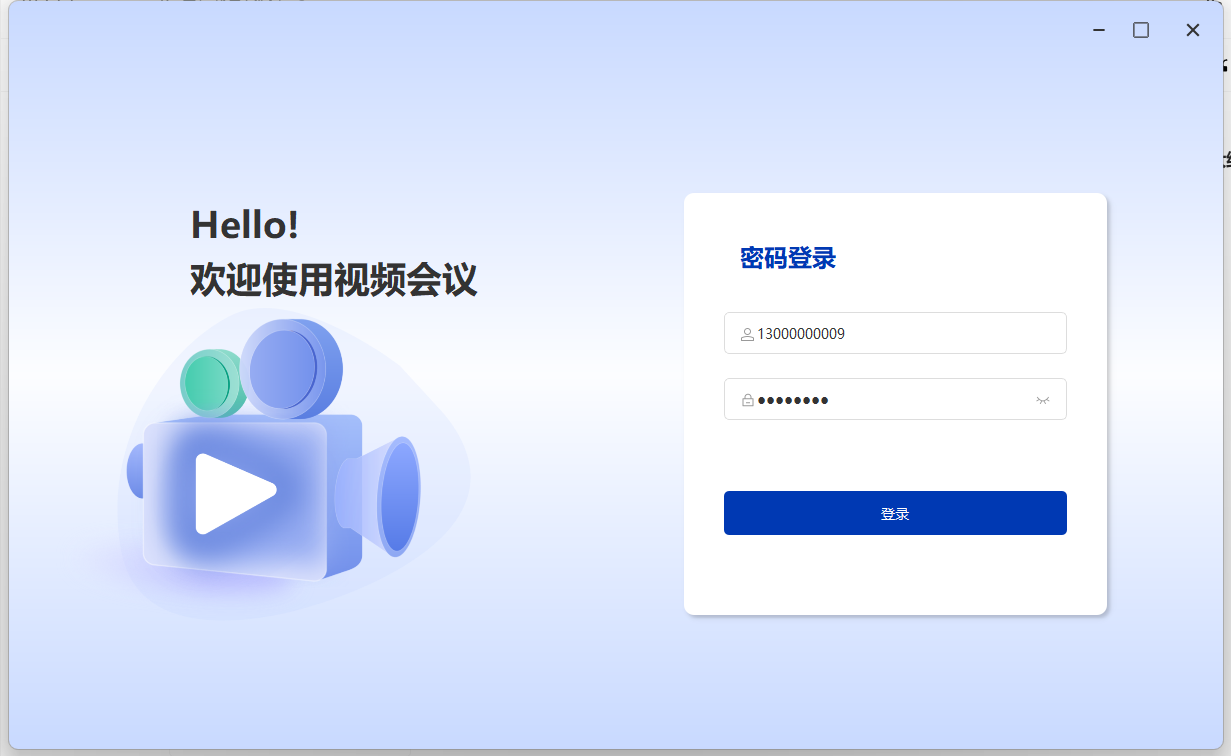
#### Login screen
```cpp theme={null}
Code directory
├─ View // Views
│ ├─ Login //
│ │ ├─ WidLogin // Login window view
```
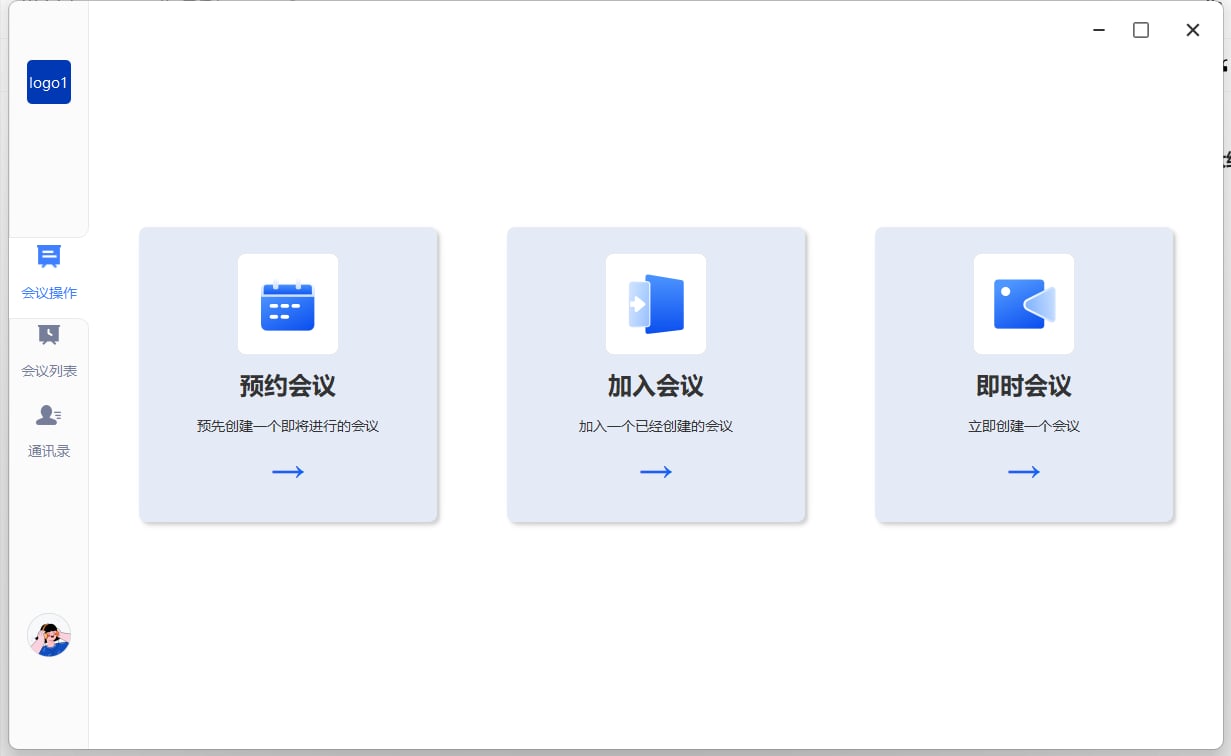
 #### Main page
```cpp theme={null}
Code directory
├─ View // Views
│ ├─ Home //
│ │ ├─ MainView //
│ │ │ ├─ WidHome // Main page
│ │ │ ├─ WidInvite // Meeting scheduling
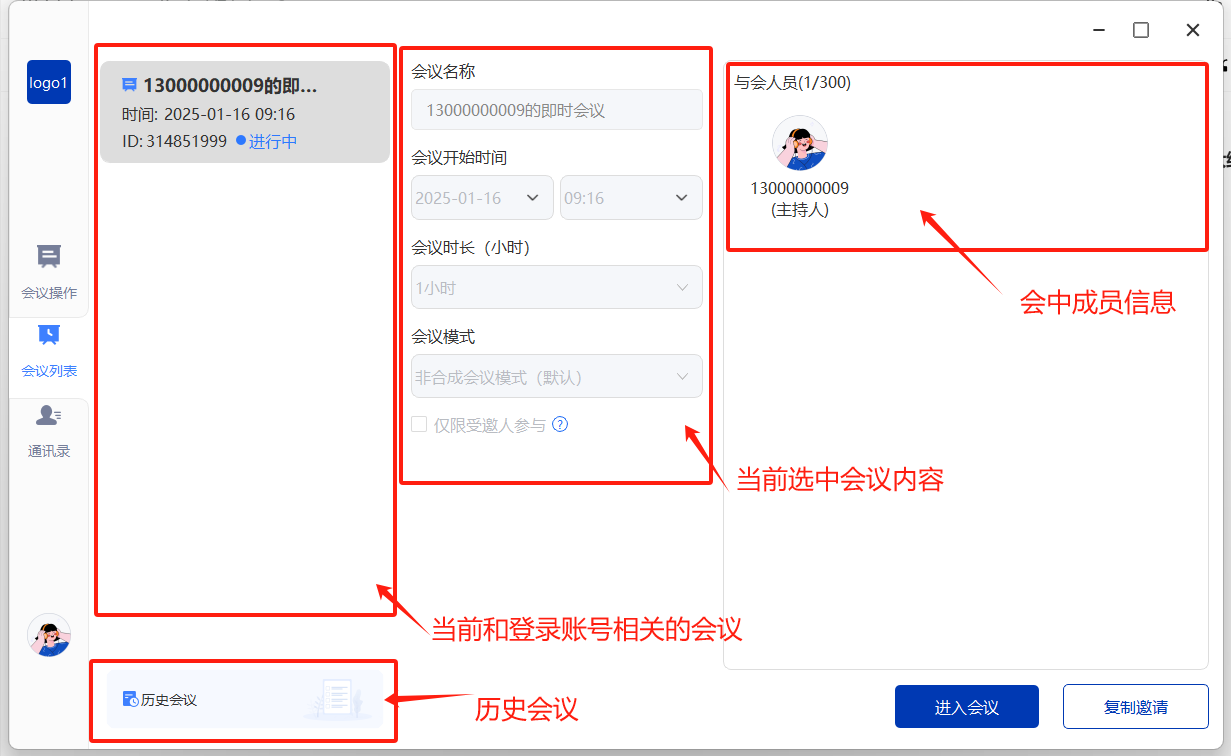
│ │ │ ├─ WidMeetingList // Meeting list
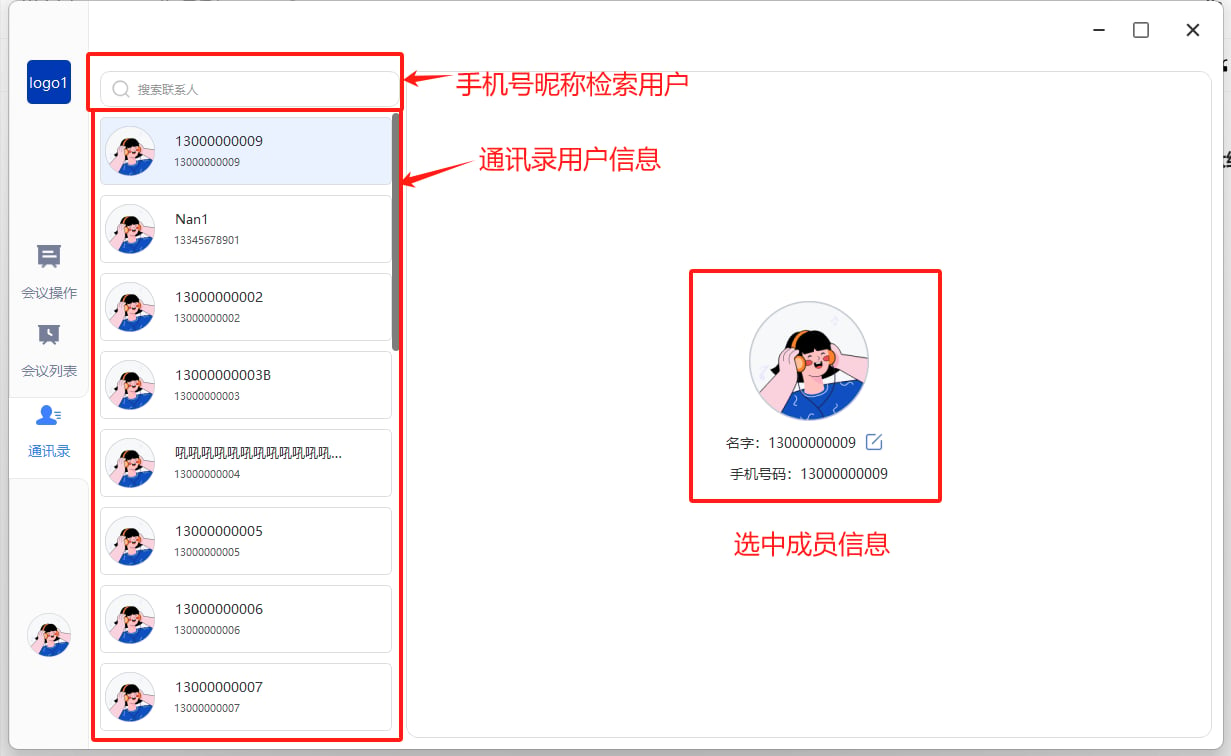
│ │ │ ├─ WidPhoneList // Contacts
```
#### Main page
```cpp theme={null}
Code directory
├─ View // Views
│ ├─ Home //
│ │ ├─ MainView //
│ │ │ ├─ WidHome // Main page
│ │ │ ├─ WidInvite // Meeting scheduling
│ │ │ ├─ WidMeetingList // Meeting list
│ │ │ ├─ WidPhoneList // Contacts
```
 ##### Meeting list
 ##### Contacts
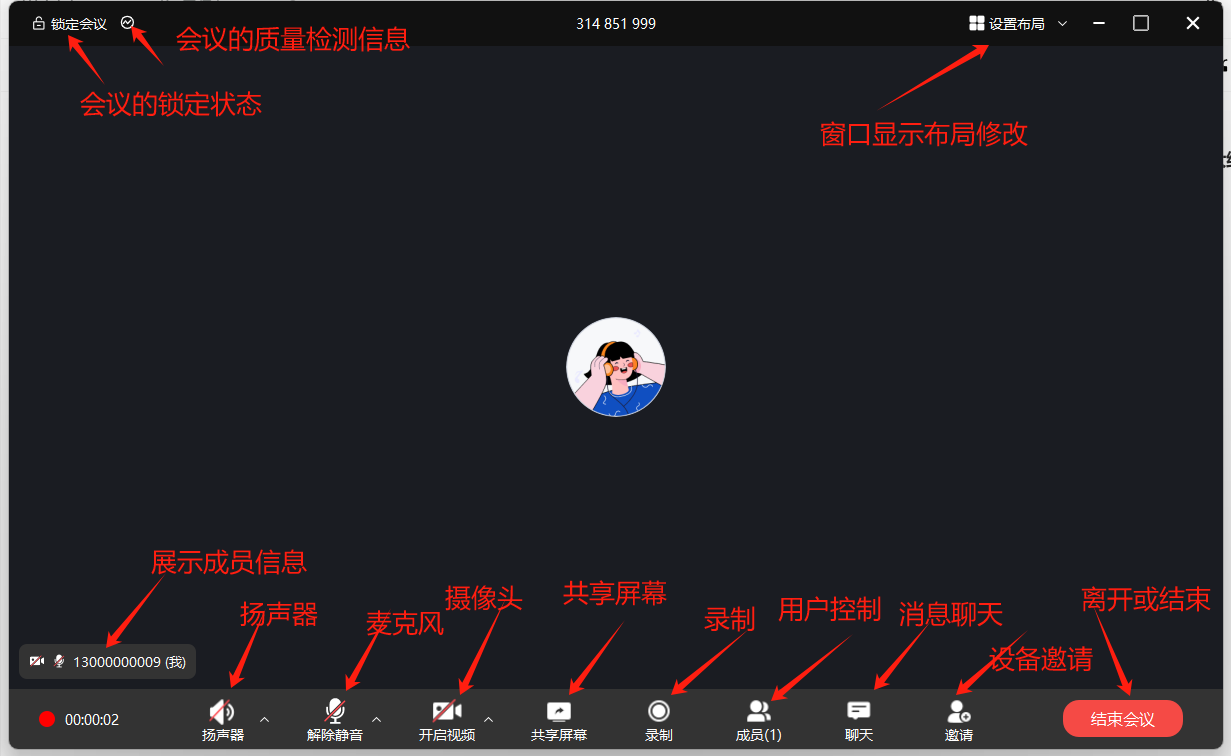
 #### In-meeting main screen
```cpp theme={null}
Code directory
├─ View // Views
│ ├─ Room // In-meeting views
│ │ ├─ Chat //In-meeting chat UI and logic
│ │ ├─ Invite //In-meeting device invitation UI and logic
│ │ ├─ Mcu //In-meeting recording and MCU layout UI and logic
│ │ ├─ Member //In-meeting member control UI and logic
│ │ ├─ RoomMain //Main in-meeting UI and logic
│ │ │ ├─ Layout //In-meeting window layout
│ │ │ │ ├─ Auto //In-meeting window layout - auto layout
│ │ │ │ ├─ Grid //In-meeting window layout - grid layout
│ │ │ │ ├─ OneMore //In-meeting window layout - large/small view layout
│ │ ├─ Setting //In-meeting settings and quality monitoring UI and logic
│ │ ├─ Share //In-meeting sharing window UI and logic
│ │ ├─ Tool //In-meeting tool windows
```
#### In-meeting main screen
```cpp theme={null}
Code directory
├─ View // Views
│ ├─ Room // In-meeting views
│ │ ├─ Chat //In-meeting chat UI and logic
│ │ ├─ Invite //In-meeting device invitation UI and logic
│ │ ├─ Mcu //In-meeting recording and MCU layout UI and logic
│ │ ├─ Member //In-meeting member control UI and logic
│ │ ├─ RoomMain //Main in-meeting UI and logic
│ │ │ ├─ Layout //In-meeting window layout
│ │ │ │ ├─ Auto //In-meeting window layout - auto layout
│ │ │ │ ├─ Grid //In-meeting window layout - grid layout
│ │ │ │ ├─ OneMore //In-meeting window layout - large/small view layout
│ │ ├─ Setting //In-meeting settings and quality monitoring UI and logic
│ │ ├─ Share //In-meeting sharing window UI and logic
│ │ ├─ Tool //In-meeting tool windows
```
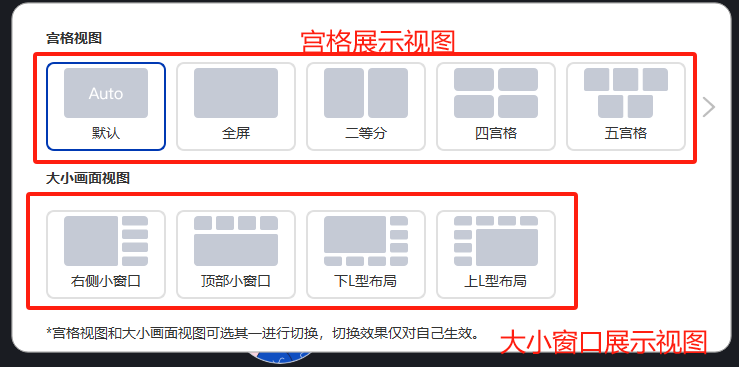
 ##### Layout switching
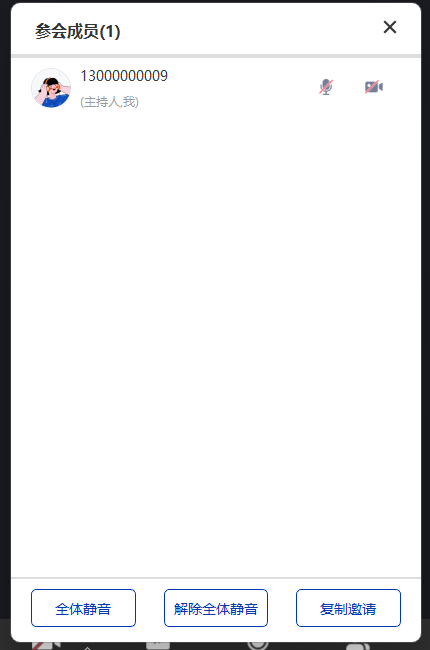
 ##### Member controls
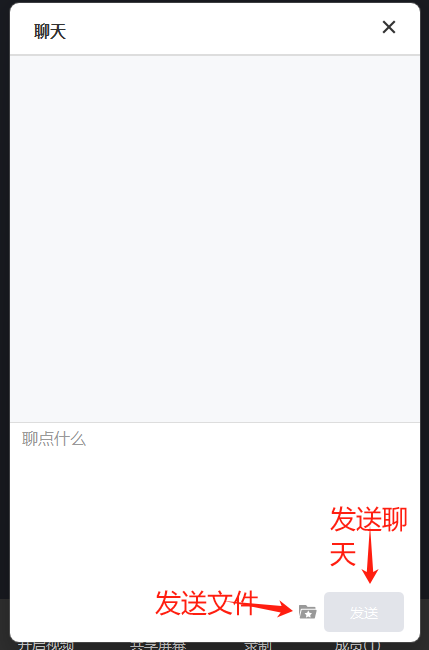
 ##### Chat messages
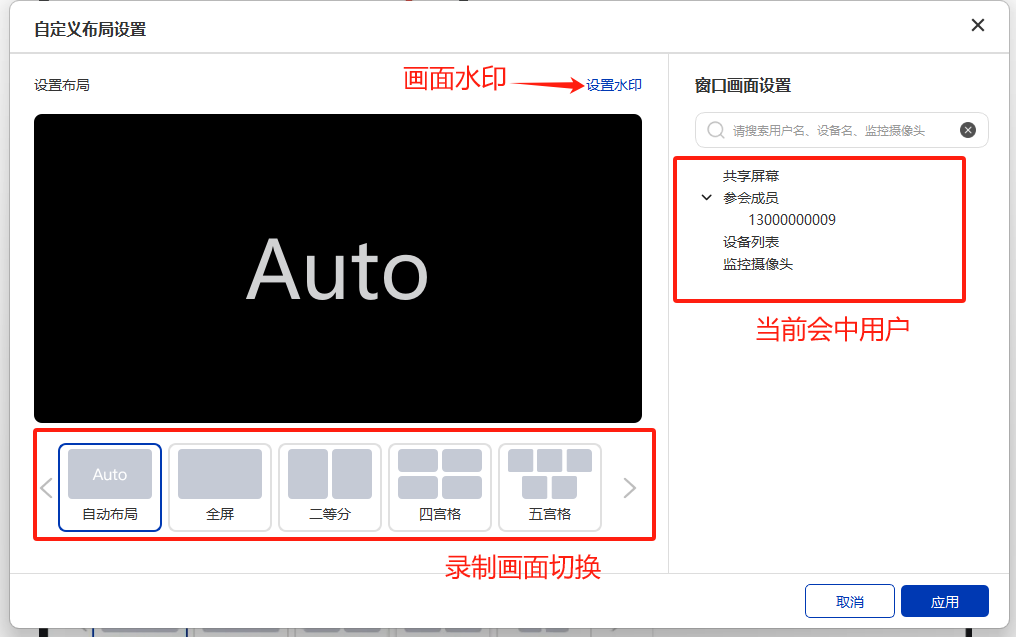
 ##### Recording layout settings
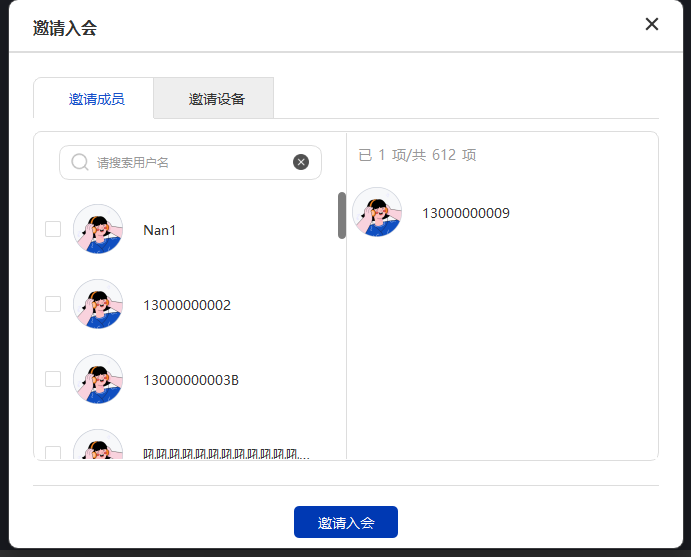
 ##### Member & device invitation
 ### Shortcut method calls
The project includes a `DemoControl` class so developers can quickly use this project (all methods in this class are exported, and developers can use them statically)
#### Settings parameter definitions
```csharp theme={null}
#define MEETINGDEMO_SETTING_URL_S 0//Server address (string)
```
#### Window enum definitions
```csharp theme={null}
#define MEETINGDEMO_VIEWTYPE_MAIN 1//Program main window
#define MEETINGDEMO_VIEWTYPE_MEETINGLIST 2//Meeting list
#define MEETINGDEMO_VIEWTYPE_MailList 3//Contacts
#define MEETINGDEMO_VIEWTYPE_ROOM_Chat 4//In-room chat window
#define MEETINGDEMO_VIEWTYPE_ROOM_MemberControl 5//In-room member control window
#define MEETINGDEMO_VIEWTYPE_ROOM_Setting 6//In-room settings & quality monitoring window
```
#### Layout enum definitions
```csharp theme={null}
#define MEETINGDEMO_VIEWTYPE_Layout_AUTO 0//Auto layout
#define MEETINGDEMO_VIEWTYPE_Layout_1 1//1-grid view
#define MEETINGDEMO_VIEWTYPE_Layout_2 2
#define MEETINGDEMO_VIEWTYPE_Layout_4 4
#define MEETINGDEMO_VIEWTYPE_Layout_5 5
#define MEETINGDEMO_VIEWTYPE_Layout_6 6
#define MEETINGDEMO_VIEWTYPE_Layout_8 8
#define MEETINGDEMO_VIEWTYPE_Layout_9 9
#define MEETINGDEMO_VIEWTYPE_Layout_10 10
#define MEETINGDEMO_VIEWTYPE_Layout_12 12
#define MEETINGDEMO_VIEWTYPE_Layout_16 16
#define MEETINGDEMO_VIEWTYPE_Layout_25 25
#define MEETINGDEMO_VIEWTYPE_Layout_FULL 10000//Full-screen view (no paging buttons)
#define MEETINGDEMO_VIEWTYPE_Layout_L1_R4 1001 //1 left, 4 right
#define MEETINGDEMO_VIEWTYPE_Layout_B1_T4 1002 //1 top, 4 bottom
#define MEETINGDEMO_VIEWTYPE_Layout_LT1_BR7 1003 //1 top-left, 7 bottom-right
#define MEETINGDEMO_VIEWTYPE_Layout_BR1_LT7 1004 //1 bottom-right, 7 top-left
```
#### Methods
##### Initialize
```csharp theme={null}
MEETING_DEMO_API int MEETING_DEMO_CALL MEETING_DEMO_Init();
```
Only initializes; no window is shown. To show a window, call
MEETING\_DEMO\_ShowView(MEETINGDEMO\_VIEWTYPE\_MAIN);
##### Release
```csharp theme={null}
MEETING_DEMO_API int MEETING_DEMO_CALL MEETING_DEMO_Free();
```
##### SDK user login shortcuts
```csharp theme={null}
MEETING_DEMO_API int MEETING_DEMO_CALL MEETING_DEMO_Login(const char* name,const char* pass);
MEETING_DEMO_API int MEETING_DEMO_CALL MEETING_DEMO_Login(const char* token);
```
###### Parameters
| name | Username |
| - | - |
| pass | Password |
| token | Token required for SDK login |
Note: after a successful call, if the UI window is already shown, it switches to the main window view
##### Global parameter configuration
```csharp theme={null}
MEETING_DEMO_API int MEETING_DEMO_CALL MEETING_DEMO_SettingData(int tp,int idata,const char* sdata);
```
###### Parameters
| tp | Parameter type |
| - | - |
Note: after a successful call, if the UI window is already shown, it switches to the main window view
##### Switch windows
```csharp theme={null}
MEETING_DEMO_API int MEETING_DEMO_CALL MEETING_DEMO_GotoView(int tp);
```
###### Parameters
| tp | Target window enum |
| - | - |
##### Show and hide windows
```csharp theme={null}
MEETING_DEMO_API int MEETING_DEMO_CALL MEETING_DEMO_ShowView(int tp);
MEETING_DEMO_API int MEETING_DEMO_CALL MEETING_DEMO_HideView(int tp);
```
###### Parameters
| tp | Window enum |
| - | - |
Note: after initialization, the main screen is hidden by default. Call showView to show the main page; you can also show it by logging in and entering a meeting directly.
##### Update the window view
```csharp theme={null}
MEETING_DEMO_API int MEETING_DEMO_CALL MEETING_DEMO_RoomUpdateLayout(int tp);
```
###### Parameters
| tp | View enum |
| - | - |
##### Get version information
```csharp theme={null}
MEETING_DEMO_API void MEETING_DEMO_CALL RTCEngine_Version(const char* version);
```
###### Parameters
| version | Version information |
| - | - |
Note: `version` must be a pointer to already allocated memory of at least 100 bytes; this function only copies the version information.
### Shortcut method calls
The project includes a `DemoControl` class so developers can quickly use this project (all methods in this class are exported, and developers can use them statically)
#### Settings parameter definitions
```csharp theme={null}
#define MEETINGDEMO_SETTING_URL_S 0//Server address (string)
```
#### Window enum definitions
```csharp theme={null}
#define MEETINGDEMO_VIEWTYPE_MAIN 1//Program main window
#define MEETINGDEMO_VIEWTYPE_MEETINGLIST 2//Meeting list
#define MEETINGDEMO_VIEWTYPE_MailList 3//Contacts
#define MEETINGDEMO_VIEWTYPE_ROOM_Chat 4//In-room chat window
#define MEETINGDEMO_VIEWTYPE_ROOM_MemberControl 5//In-room member control window
#define MEETINGDEMO_VIEWTYPE_ROOM_Setting 6//In-room settings & quality monitoring window
```
#### Layout enum definitions
```csharp theme={null}
#define MEETINGDEMO_VIEWTYPE_Layout_AUTO 0//Auto layout
#define MEETINGDEMO_VIEWTYPE_Layout_1 1//1-grid view
#define MEETINGDEMO_VIEWTYPE_Layout_2 2
#define MEETINGDEMO_VIEWTYPE_Layout_4 4
#define MEETINGDEMO_VIEWTYPE_Layout_5 5
#define MEETINGDEMO_VIEWTYPE_Layout_6 6
#define MEETINGDEMO_VIEWTYPE_Layout_8 8
#define MEETINGDEMO_VIEWTYPE_Layout_9 9
#define MEETINGDEMO_VIEWTYPE_Layout_10 10
#define MEETINGDEMO_VIEWTYPE_Layout_12 12
#define MEETINGDEMO_VIEWTYPE_Layout_16 16
#define MEETINGDEMO_VIEWTYPE_Layout_25 25
#define MEETINGDEMO_VIEWTYPE_Layout_FULL 10000//Full-screen view (no paging buttons)
#define MEETINGDEMO_VIEWTYPE_Layout_L1_R4 1001 //1 left, 4 right
#define MEETINGDEMO_VIEWTYPE_Layout_B1_T4 1002 //1 top, 4 bottom
#define MEETINGDEMO_VIEWTYPE_Layout_LT1_BR7 1003 //1 top-left, 7 bottom-right
#define MEETINGDEMO_VIEWTYPE_Layout_BR1_LT7 1004 //1 bottom-right, 7 top-left
```
#### Methods
##### Initialize
```csharp theme={null}
MEETING_DEMO_API int MEETING_DEMO_CALL MEETING_DEMO_Init();
```
Only initializes; no window is shown. To show a window, call
MEETING\_DEMO\_ShowView(MEETINGDEMO\_VIEWTYPE\_MAIN);
##### Release
```csharp theme={null}
MEETING_DEMO_API int MEETING_DEMO_CALL MEETING_DEMO_Free();
```
##### SDK user login shortcuts
```csharp theme={null}
MEETING_DEMO_API int MEETING_DEMO_CALL MEETING_DEMO_Login(const char* name,const char* pass);
MEETING_DEMO_API int MEETING_DEMO_CALL MEETING_DEMO_Login(const char* token);
```
###### Parameters
| name | Username |
| - | - |
| pass | Password |
| token | Token required for SDK login |
Note: after a successful call, if the UI window is already shown, it switches to the main window view
##### Global parameter configuration
```csharp theme={null}
MEETING_DEMO_API int MEETING_DEMO_CALL MEETING_DEMO_SettingData(int tp,int idata,const char* sdata);
```
###### Parameters
| tp | Parameter type |
| - | - |
Note: after a successful call, if the UI window is already shown, it switches to the main window view
##### Switch windows
```csharp theme={null}
MEETING_DEMO_API int MEETING_DEMO_CALL MEETING_DEMO_GotoView(int tp);
```
###### Parameters
| tp | Target window enum |
| - | - |
##### Show and hide windows
```csharp theme={null}
MEETING_DEMO_API int MEETING_DEMO_CALL MEETING_DEMO_ShowView(int tp);
MEETING_DEMO_API int MEETING_DEMO_CALL MEETING_DEMO_HideView(int tp);
```
###### Parameters
| tp | Window enum |
| - | - |
Note: after initialization, the main screen is hidden by default. Call showView to show the main page; you can also show it by logging in and entering a meeting directly.
##### Update the window view
```csharp theme={null}
MEETING_DEMO_API int MEETING_DEMO_CALL MEETING_DEMO_RoomUpdateLayout(int tp);
```
###### Parameters
| tp | View enum |
| - | - |
##### Get version information
```csharp theme={null}
MEETING_DEMO_API void MEETING_DEMO_CALL RTCEngine_Version(const char* version);
```
###### Parameters
| version | Version information |
| - | - |
Note: `version` must be a pointer to already allocated memory of at least 100 bytes; this function only copies the version information.